Drill down to specific box using URL parameter in Org Chart (SharePoint Server 2019/SE)
In this quick tip I will describe how to navigate to specific box in your org chart using URL parameter.
Drill down to specific box
It may be useful if you want to place link to specific box to other page. For example, you can use it to open org chart starting from manager of specific department. Some of our customers use this approach to add link to employees search results. Thus, you can navigate to person in org chart directly from search results.
In my case Org Chart web part is located here:
https://sharepoint.contoso.com/sites/hr/SitePages/orgchart.aspx
I want to be able to navigate to specific box using URL like this:
https://sharepoint.contoso.com/sites/hr/SitePages/orgchart.aspx?boxID=domain%5Cusername
Depending on your configuration, Org Chart uses a specific property as the box ID.
For User Profiles, this is usually a domain account name such as domainusername.
For a SharePoint list data source, it can be another field value, such as the list item ID.
Thus, boxID is the employee identifier used by your Org Chart data source.
Open the configuration wizard of Org Chart, navigate to Custom JavaScript step and paste this code into code editor:
var boxId = GetUrlKeyValue("boxID");

//if there is boxID in URL
if(boxId) {

  //Skip initial rendering to speed up the process
  renderer.config.renderInitialNode = false;

  //Wait for web part loading
  renderer.onInitialLoadingFinished(function(){
    //Drill down to box from URL parameter
    renderer.drillDown(boxId);
  });

}
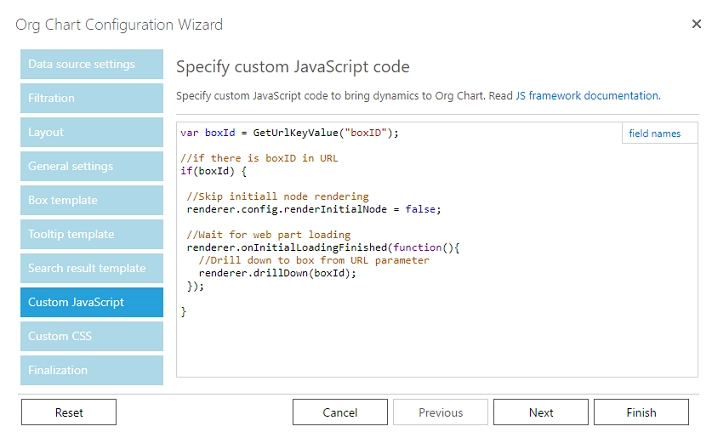
Finish the wizard. That is it! Now you can navigate to specific box in your organizational structure using URL parameter.
Drill down to manager of user
Instead, if you want to drill down to a manager of a user based on a URL parameter on Org Chart load, please follow the steps detailed below:
It will take accountname URL parameter and drill down to a manager of this user on Org Chart load.
If there no URL parameter it will drill down to a manager of a current user.
If there is no manager, it will drill down to this user.
This works in Org Chart for SharePoint Server 2019/SE.
In my case, Org Chart web part is located here:
https://sharepoint.contoso.com/sites/hr/SitePages/orgchart.aspx
I want to be able to drill down to a manager of a user using URL like this:
https://sharepoint.contoso.com/sites/hr/SitePages/orgchart.aspx?accountname=domain%5Cusername
Depending on your configuration, Org Chart uses a specific property as the box ID.
For User Profiles, this is usually a domain account name such as domainusername.
For a SharePoint list data source, it can be another field value, such as the list item ID.
Thus, accountname is the employee identifier used by your Org Chart data source.
Open the configuration wizard of Org Chart, navigate to Custom JavaScript step and paste this code into code editor:
var accountNameFromUrl = GetUrlKeyValue("accountname");

function drillDownToManagerOfUser(accountName) {

  renderer.dataProvider.getBoxGroupItemDataById(accountName,
    function (dataItem) {

      if (dataItem.ParentId) {
        console.log("Drilling down to manager: " + dataItem.ParentId);
        renderer.drillDown(dataItem.ParentId);
      } else {
        console.log("Drilling down to user: " + accountName);
        renderer.drillDown(accountName);
      }

    });
}

//Don't wait for loading of initial root employee
renderer.config.renderInitialNode = false;

//Wait for web part loading
renderer.onInitialLoadingFinished(function () {

  //if there is accountNameFromUrl in URL
  if (!accountNameFromUrl) {

    //Drill down to current user's manager if exists
    renderer.dataProvider.getCurrentUserAccountName(function (accountName) {
      drillDownToManagerOfUser(accountName)
    })

  } else {

    //Drill down to a manager of a user from URL if exists
    drillDownToManagerOfUser(accountNameFromUrl)

  }

});
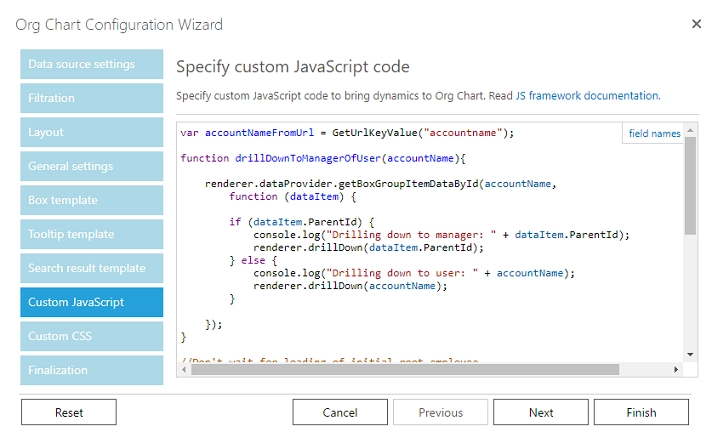
Finish the wizard. That is it! Now you can navigate to manager of a user according to a URL parameter.
How it works
When your web part is loaded, custom JavaScript code is executed. This code disables initial rendering of web part to make drill down instead of waiting for web part loading:
renderer.config.renderInitialNode = false;
Then it checks if there is URL parameter accountname. If the URL parameter is not specified, it gets current user account name and tries to drill down to a manager of a current user. If there is no manager, it drills down to a current user:
//Drill down to current user's manager if exists
renderer.dataProvider.getCurrentUserAccountName(function (accountName) {
  drillDownToManagerOfUser(accountName)
})
If the URL parameter is specified it tries to drill down to a manager of account name from the URL parameter:
//Drill down to a manager of a user from URL if exists
drillDownToManagerOfUser(accountNameFromUrl)
Drill down logic is implemented in drillDownToManagerOfUser JavaScript function:
function drillDownToManagerOfUser(accountName) {

  renderer.dataProvider.getBoxGroupItemDataById(accountName,
    function (dataItem) {

      if (dataItem.ParentId) {
        console.log("Drilling down to manager: " + dataItem.ParentId);
        renderer.drillDown(dataItem.ParentId);
      } else {
        console.log("Drilling down to user: " + accountName);
        renderer.drillDown(accountName);
      }

    });
}