Logical operations in XLSX templates
Logical operations determine how the markup in your template is generated based on the data provided. Unlike calculated properties, which are initialized upfront, logical operations are handled in real time as the document is generated.
You can use the following operators with the logical operations:
>greater than,>=greater than or equal to,<less than,<=less than or equal to,==equal to,!=not equal to,&&logical AND,||logical OR.
if
The #if logical operator creates a conditional block, allowing content to be displayed or hidden based on specific conditions.
Example structure:
{{#if property == null}}
Content
{{#else}}
Else content
{{/if}}
Inside the #if / #else block, you can use other functions (for example, the map function) and calculated properties.
This allows you to build the same output value in different ways, depending on the condition.
This is useful when the final result should be a single value, but the logic used to produce that value varies based on the input data.
Example structure:
{{#if condition}}
{{variable = expression}}
{{#else}}
{{variable = variable|map(...) }}
{{/if}}

Result: {{variable}}
Examples
Template |
Data |
|---|---|
{{#if customer.vatRegistered}}
VAT ID: {{customer.vatID}}
VAT Amount: ${{customer.vatAmount|format(C)}}
{{/if}}

{{#if customer.vatID|starts-with(GB)}}
This customer is valid.
{{/if}}
|
{
    "customer": [
        {
            "vatRegistered": true,
            "vatID": "GB12345678",
            "vatAmount": "36.60"
        }
    ]
}
|
{{#if customer != null}}
Name: {{customer.name}}
Address: {{customer.address}}
{{#else}}
No customer information provided.
{{/if}}
|
{
    "customer": [
        {
            "name": "John Doe",
            "address": "215 W 5th St, New York"
        }
    ]
}
|
{{#if isActive}}Active{{#else}}Disabled{{/if}}
|
{
    "isActive": false
}
|
{{#if orderType == "scopeOnly"}}
{{orderDescription = "Scope update for project: " + projectName}}
{{#else}}
{{orderDescription = orderType|map(
  "timelineOnly" => "Timeline adjustment only",
  "scopeAndTimeline" => "Scope and timeline adjustment")}}
{{/if}}
Order summary: {{orderDescription}}
|
{
  "orderType": "scopeOnly",
  "projectName": "Website Redesign"
}
|
Hint
For more information on conditional hiding, check out this article.
hide-if
The #hide-if logical operation hides the closest repeatable objects such as tables or list items based on specified conditions.
Note
To hide items from an array, we recommend using the filter function instead.
Examples
Template |
Data |
|---|---|
{{count}} {{#hide-if count == 1}}
|
{
    "count": 1
}
|
{{employee.name}} {{#hide-if employee.name == "Jessica"}}

{{employee.email}} {{#hide-if employee.email|ends-with(@company.com, true)}}
|
{
    "employee": {
        "name": "Jessica",
        "email": "jessica@Company.com"
    }
}
|
{{items.title}} {{#hide-if items|count() == 0}}
{{items.description}} {{#hide-if items.category == "Software" || delivery != true}}

{{items.title}} {{#hide-if items.description|contains(Out of stock, true)}}
|
{
    "items": [
        {
            "title": "Keyboard",
            "category": "Accessory",
            "description": "Sleek & Silent"
        }
    ],

    "delivery": true
}
|
Hint
For more information on conditional hiding, check out this article.
line-break-if
The line-break-if function inserts a line break at the specified position within a cell when the condition evaluates to true.
Important: Requires the Wrap Text option to be enabled on the target cell in the Excel template.
Example
Template |
Data |
Result |
|---|---|---|
Before the break. {{#line-break-if isActive}} After the break.
|
{
  "isActive" : true
}
|
Before the break.
After the break.
|
merge
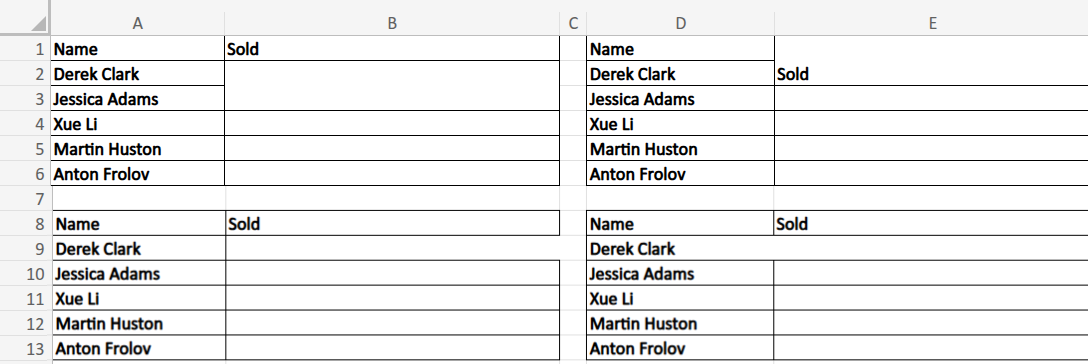
This function merges a table cell with an adjacent cell in the specified direction if the given condition is met. To control the merge direction use:
{{#merge-left-if condition}}{{#merge-right-if condition}}{{#merge-top-if condition}}{{#merge-bottom-if condition}}
Note
This formatter doesn’t support merging cells in table ranges. Thus, if you want to use this formatter, apply it to regular Excel cells instead.
Examples
Template

Data
    {
        "collection": [
            {
                "name": "Derek Clark",
                "sold": null
            },
            {
                "name": "Jessica Adams",
                "sold": 14000
            },
            {
                "name": "Xue Li",
                "sold": 500
            },
            {
                "name": "Martin Huston",
                "sold": 9400
            },
            {
                "name": "Anton Frolov",
                "sold": 1000
            }
        ]
    }

-
Results