Working as a tech support engineer at Plumsail, I've noticed a spike in requests from users looking for a Nintex Forms alternative. I was curious about what was bringing these users to us, especially since Nintex Forms has been a popular tool for creating custom forms in SharePoint for many years.
To understand the 'why' behind this, I dug deeper. I found that many organizations are seeking alternatives to Nintex Forms due to its limitations, high costs, and the retirement of Microsoft SharePoint Add-ins. In this blog post, I've put together all my findings and insights, and I hope it helps you if you're also looking for a form designer tool for your SharePoint Online or On-Premises environment.
If you are ready to test a Nintex Forms alternative, start a free trial of Plumsail Forms today to experience its features firsthand and discover why it's an excellent choice for your business.
I always thought that Nintex Forms was a great tool for creating custom forms in SharePoint. It has been around for a long time and has a large user base. However, as I started to dig deeper into the topic, I found many reviews and posts highlighting a lack of features, high costs, poor support, and lacking documentation.
Based on user reviews and my own hands-on experience with Nintex, I've highlighted three main reasons why organizations should consider a Nintex Forms alternative.
Nintex Forms and Microsoft's Add-in retirement
Microsoft retired Add-ins for SharePoint Online on April 2, 2026. As a result, Nintex Forms, initially an Add-in, has migrated to the SharePoint Framework (SPFx).
Which is great news! But not for users with existing old responsive and classic forms. They must migrate to the new responsive forms and the process is not smooth.
After upgrading forms, some custom JavaScript or older form controls might no longer be supported or function as expected in the new SPFx-based Nintex Forms. This will require rebuilding forms and testing to ensure that forms continue to work correctly. It is a time-consuming and potentially costly process, especially if there are many forms.
What's more, not all functionality from the classic Nintex Forms is available in the new responsive Nintex Forms. Users complain that after migrating forms, they lose some of the features they relied on in the classic version.
I can't migrate any of my forms and workflows because the functionality doesn't exist in the "new" SPO world? So it's not just that I have to rebuild them but I have to redesign them as well?
This transition also includes a change in Nintex's product structure. Nintex Forms is no longer a standalone product—it's now bundled with Nintex Automation Cloud (Nintex Workflow). This might not suit organizations focused solely on form-building without extra automation features.
Furthermore, it leads to price increases.
Non-transparent and rising prices for Nintex
Nintex's pricing is another reason to consider alternatives. The recent price change is not the first time Nintex has raised its prices, and it likely won't be the last. This is a user comment back from 2023, but it still holds true:
Nintex pricing skyrocketed in the last 5 years too, it’s like they were shooting themselves in the foot.
Plus, there's no publicly available pricing information—you can't simply visit their website and make a purchase.
You must contact their sales representative, schedule a call with them, and provide project details to receive a quote. My experience left me with the impression that the price might not be based on objective, measurable criteria, raising concerns about fairness and transparency.
What I found out is that as of June 2026, the annual subscription price for Nintex Automation Cloud for SharePoint Online starts at $15,000, and for the SharePoint On-Premises version—$25,000. These could be too much for some organizations or those with tight budgets.
Functionality limitations
Nintex Forms functionality is restrictive for even some basic requirements, such as creating personalized forms or dynamically filtering lookup values by multiple rules.
Is Nintex even working on adding more functionality to responsive forms? ... If not I will plan to move off Nintex in my company of 5000 users
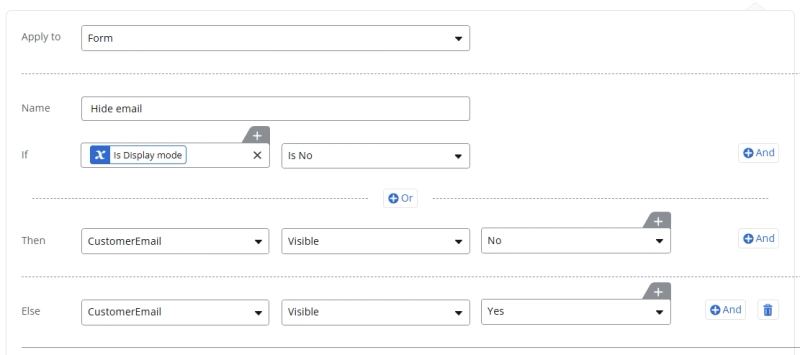
For example, customizing forms to look and behave differently for viewing and editing is a tedious process. It requires significant time and patience, as you must apply rules to each control individually. Just imagine writing these kinds of rules when you have more than 20 fields on your form:
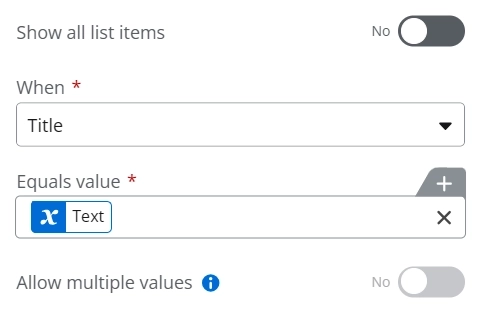
The lookup field in Nintex Forms is another example of a limitation. You can only filter the lookup field by a single value, and you cannot use multiple conditions or complex logic to filter the options dynamically:
What's more, you can't get extra data from the Lookup field source list, which is a basic functionality in SharePoint. I found requests for these features in the Nintex Community, but it still has not been implemented:
On SharePoint Online these additional columns are available and can be displayed for instance in a list view.
At the moment, these additional columns are not available from Nintex forms (For O365 new responsive forms)
Additionally, the New Responsive Forms don't support the Nintex List Forms Online Web Part, which was commonly used to embed Nintex Forms in SharePoint pages. This web part created a more integrated experience than simply redirecting users to an external list form page.
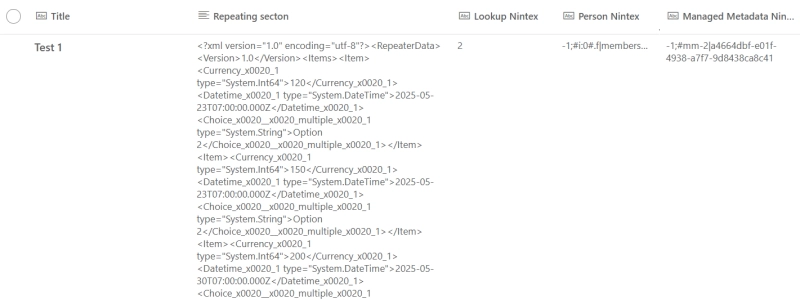
And in general, Nintex Forms is not 100% integrated with SharePoint. For instance, when using Nintex controls like Repeating Section or List Lookup, data is often saved to SharePoint columns in XML format. While this is great for a workflow to programmatically parse and use, for a human looking at the SharePoint list item, it's just a jumbled string of text that is difficult to read:
Plumsail Forms—a flexible and affordable alternative to Nintex Forms
If you've read this far, it's clear you need an alternative to Nintex, and Plumsail Forms might be exactly what you're looking for.
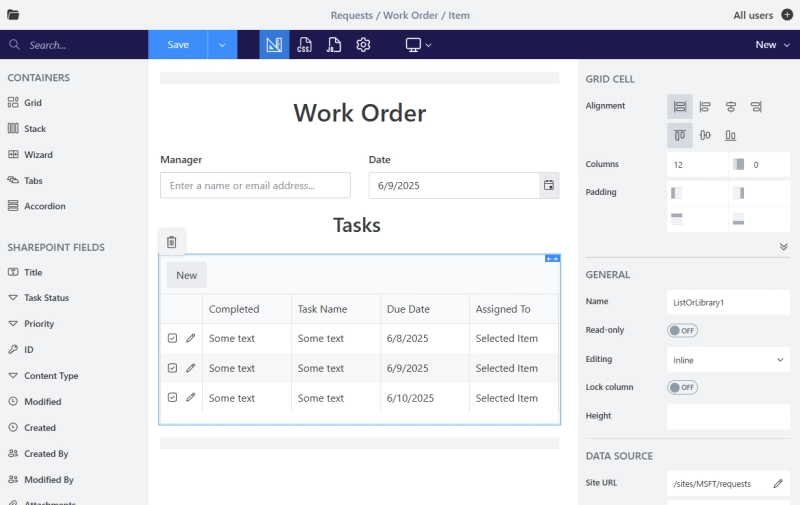
Plumsail Forms is a form builder for SharePoint Online and On-Premises. You design forms in a drag-and-drop editor: drag list columns onto the canvas, arrange them with layout containers, and apply conditional rules.
Moreover, it offers a wide range of features that stand out compared to Nintex Forms:
Various containers: Add Tabs, Accordion, or Wizard to organize form elements.
Grid layout: Use Grid or Stack containers to create various layouts.
Separate New, Edit, and Display forms: Create unique forms for each view without complex rules.
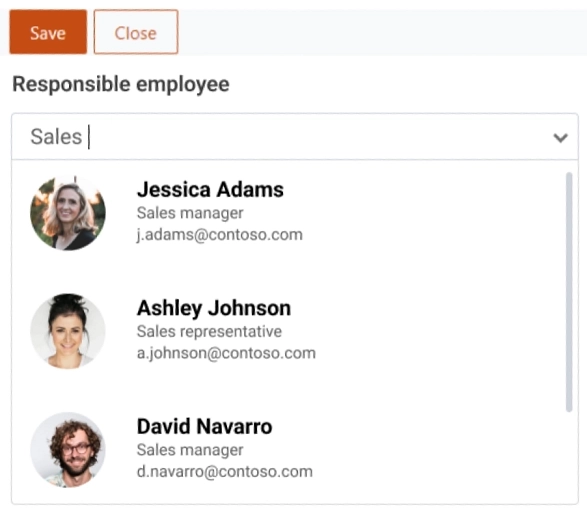
Robust Lookup field: Filter lookup values by multiple conditions and modify the appearance of options.
See the comparison table between Nintex Forms and Plumsail Forms for a quick overview of the key differences:
Nintex Forms
Plumsail Forms
Transparent pricing
Starting price (SPO/year)
from $15,000*
$899*
Standalone forms product
Separate New/Edit/Display forms
No-code conditional rules
Per element
Advanced Lookup filtering
In form related data
Signature control
Repeating data
SharePoint Online & On-Premises
*Pricing as of June 2026; check each vendor's site for current figures.
Now, let's take a closer look at some of the key points that make Plumsail Forms a standout alternative to Nintex Forms.
Straightforward and transparent Pricing
Plumsail Forms for SharePoint offers a clear and straightforward pricing model:
SharePoint Online: subscription-based, per domain. No limitations on the number of users, forms, sites, or lists. No hidden costs or extra fees. Annual subscription: $899 (as of June 2026). Monthly subscription: $89.
Development License for On-Premises: allows you to create and test forms. Available for $599 per WFE server.
Compared to Nintex Forms, Plumsail Forms is significantly more affordable, saving your business at least $14,000 per year in a SharePoint Online environment..
Plumsail Forms is priceless for me and adds a lot of value, and I think that you are bringing the best value-for-money among your competitors.
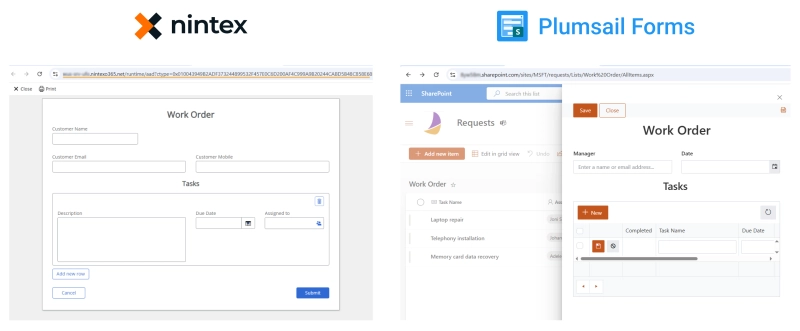
Unlike Nintex Forms, forms created with Plumsail Forms are hosted directly on your SharePoint tenant and render natively inside SharePoint.
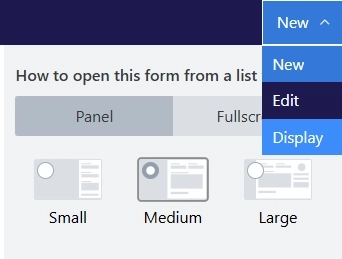
This provides you with forms that look and function as a native part of SharePoint, eliminating redirection to external sites. And you can choose whether the form opens in full screen or a panel:
Separate forms for New, Edit & Display views
Unlike Nintex Forms, which relies on a single form with conditional rules to manage New, Edit, and Display views, Plumsail Forms allows you to create distinct forms for each view.
This simplifies the design process by eliminating complex formulas or time-consuming rule configurations. Switch between form types to design each form, and Plumsail automatically directs users to the corresponding form.
Personalized forms
If your business process involves multiple steps and many people, creating additional forms will simplify data handling. With form sets in Plumsail Forms for SharePoint, you can create personalized SharePoint forms and configure routing based on Microsoft 365 or SharePoint groups.
You can create as many form sets as you need and customize routing based on a condition. Display different forms depending on the item field value, create forms in multiple languages, and more.
Filtering and sorting Lookup values
In Plumsail Forms, you can create dynamic filtering of options in the Lookup field by multiple conditions, using various operators beyond 'equals'. This allows you to create more complex filtering logic than in Nintex Forms.
Add Plumsail's advanced fields and controls to your forms to boost functionality and user experience.
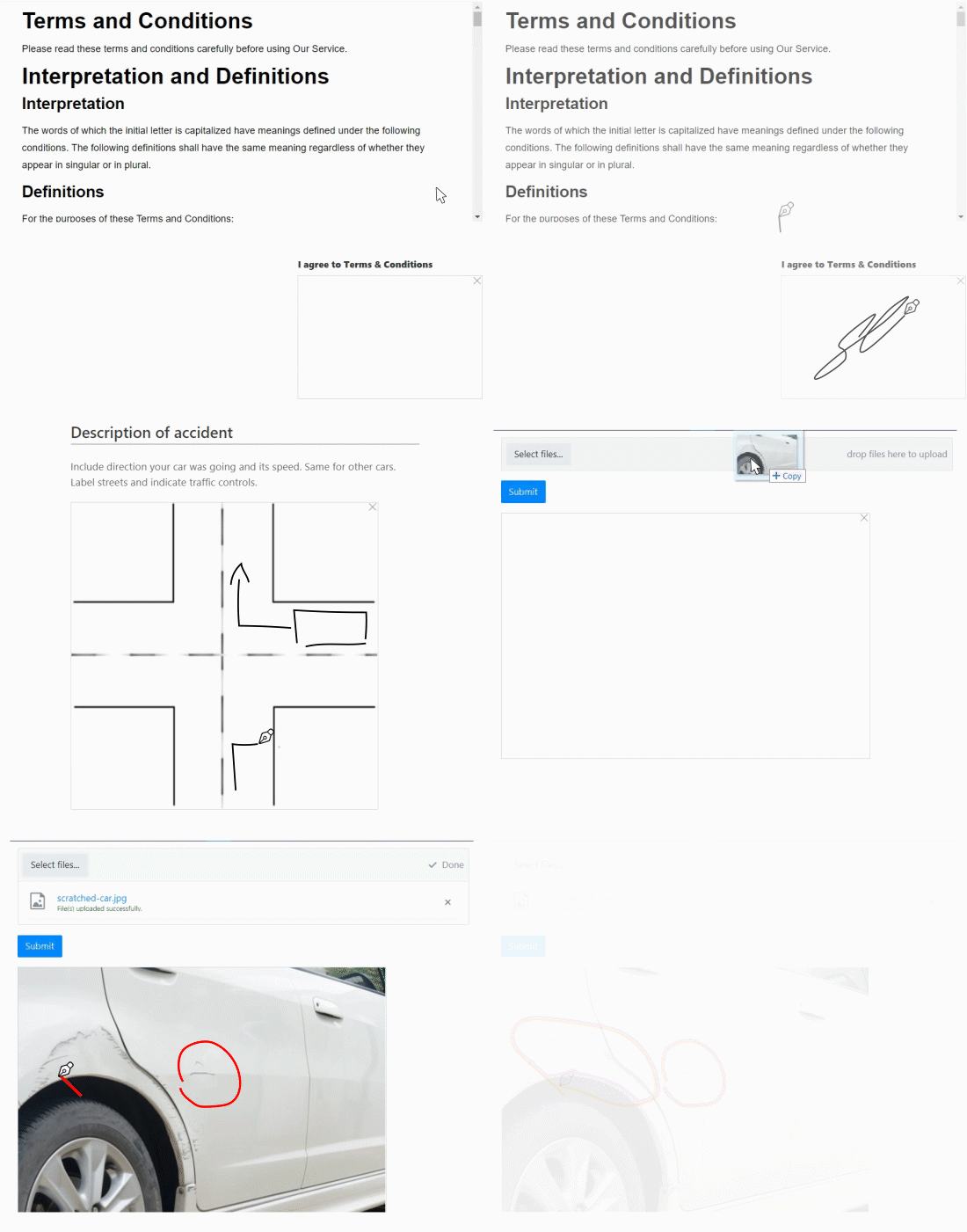
Ink Sketch is the alternative to Nintex's Signature field. It allows users to draw or write directly on the form, making it ideal for signatures, sketches, or handwritten notes. The Ink Sketch control is saved as a base64 string in SharePoint and rendered in a SharePoint list view.
Likert Scale is a great tool to gather valuable feedback from your customers or employees, measure the overall experience, or conduct competitive analysis.
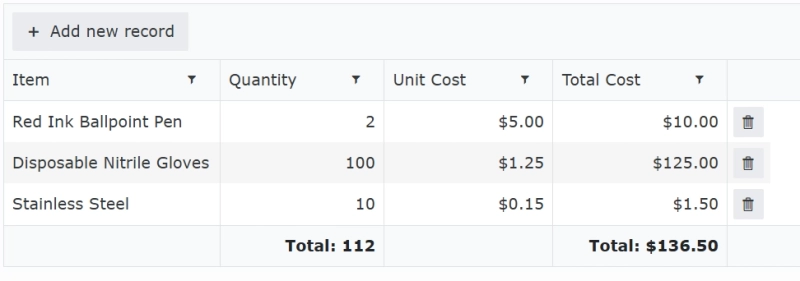
Data Table is a powerful control that allows you to create dynamic tables for collecting repeating data, similar to repeating sections in Nintex. You can populate column values for a new row, add custom validation rules, add totals calculation by row or column, and more. The Data Table control is saved as a JSON string in SharePoint and rendered in a SharePoint list view.
Rating is a simple and effective way to collect feedback from users. You can set any icons for the rating control, including stars, hearts, or thumbs up/down.
Barcode is a powerful tool for scanning barcodes and QR codes directly within your forms. It allows you to capture data quickly and accurately, making it ideal for inventory management, asset tracking, and other applications.
Values of these controls are saved in SharePoint columns and rendered in a SharePoint list view:
Related data
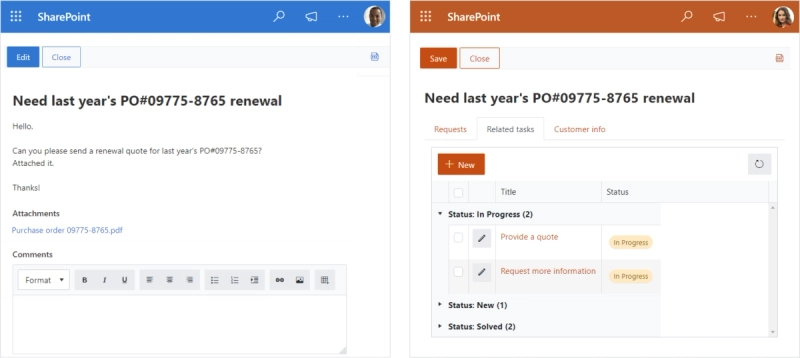
While Nintex Forms doesn't offer built-in ways to handle related data from other lists or libraries in the same form, Plumsail provides a dedicated List or Library control for this.
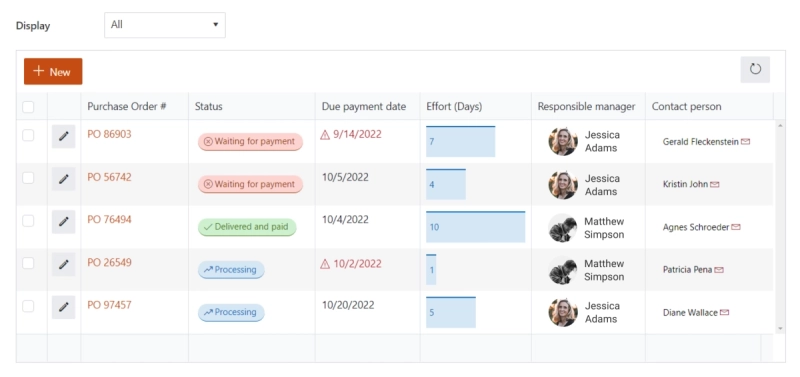
With just two steps, you can add related data even from another site to your form, customize column appearance, apply filtering based on form fields, define the root folder, and more. And work with related data in quick edit or dialog mode.
Bonus: Embed a customized view of your SharePoint list or library to any page in your SharePoint site using Plumsail List web part.
Advanced logic
Nintex works well for creating simple forms with minimal logic using its rules tool, which is great for non-technical users. However, you will likely find yourself frustrated when creating more complex rules, adding conditions and actions to each element one by one for dynamic forms.
Nintex Forms was a robust tool, it was geared toward non-developers and didn't meet our requirements for customization. Thinking of building our own tools, we were not sure if we could do both—tools and solutions, and that's when we discovered Plumsail.
Justin Mitchell, COO and Senior Consultant at Consult2.Cloud
Like Nintex, Plumsail Forms lets you build form logic without writing any code — but with far less repetition. Add a conditional rule to any field, control, or container to show, hide, enable, or disable it based on another field's value, directly in the designer. For example, you can:
Show or hide a field or section based on another field's value
Enable or disable a field depending on a previous answer
Disable the Save button until required fields are filled in
The key difference from Nintex is the container. Instead of attaching the same condition to twenty fields one at a time, you can place those fields inside a Tab, Accordion, or Grid container and apply a single rule to the whole group — so reworking a 20-field form takes one rule, not twenty.
And when no-code rules aren't enough, Plumsail Forms goes further with JavaScript. Even with a basic knowledge of JavaScript, you can design truly dynamic forms — custom logic, calculations, and validations — to build complex forms that meet your specific needs.
If you are not a developer, you can use samples from the Plumsail documentation, which provides a wide range of ready-made code snippets for various scenarios. For example, with a few lines of code, you can populate fields, run a function when a field value changes, or limit the date range in the calendar.
Nintex Forms users who had to migrate to the new SPFx-based solution, want to save budget, or simply want to create more advanced forms should consider Plumsail Forms as a reliable alternative.
Plumsail Forms, with its straightforward pricing, powerful features, and integration with SharePoint is an excellent choice for businesses of all sizes.
Migrate to the cloud with SharePoint Forms and Consult2.Cloud expertise
Explore how Consult2.Cloud delivers cloud migration services with Plumsail Forms for SharePoint in large-scale applications such as sales and payroll processing.
Justin Mitchell
COO and Senior Consultant at Consult2.Cloud
Customer storyFormsMicrosoft 365SharePointPower AutomateMicrosoft Teams
May 16, 2024
Finding the best InfoPath replacement, SharePoint journey of an Australian government agency
Learn how SATC, a South Australian government agency, moved to the cloud and switched from InfoPath to SharePoint forms in their journey to find the best InfoPath replacement option.
Luke Gackle
ICT Service Desk Officer at South Australian Tourism Commission
FormsPower Automate
Last updated: Jun 18
Advanced Microsoft Forms alternative
Create advanced forms with branding, variety of fields and controls, containers, conditional logic and optional authorization








 FormsSharePoint