Use Plumsail Forms as REST API
Plumsail Forms provides a REST API to manage forms, submissions, and attachments programmatically.
Swagger API reference
You can find the Swagger API reference for Plumsail Forms at:
Authentication
This API uses API keys for authentication. To create one, open the Forms section in your Plumsail account and go to the API keys page. Click the Add key button and give your key a descriptive name.
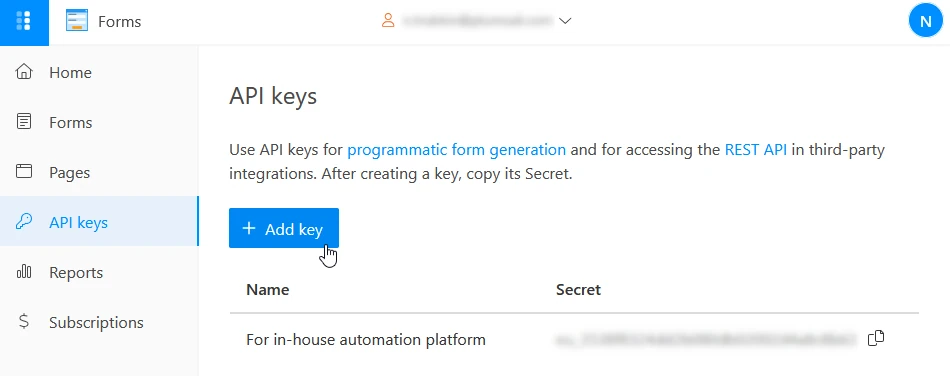
Now that you have a key, copy its secret and pass it in the X-Api-Key header for API calls that require authentication.
Call the API from your code
This API is REST-based. Thus, you can use any programming language that can execute web requests, such as C#, PowerShell, Node.js, Python, or PHP.
There are a lot of ready to use helper REST API clients for those languages. Here are some of them:
RestSharp for C#
Invoke-RestMethod cmdlets for PowerShell
request - Simplified HTTP client for Node.js
Requests: HTTP for Humans for Python
Guzzle for PHP
Common API operations
The following endpoints let you manage forms, listen to new submissions, and delete attachments and submissions from your Plumsail account.
Get all public forms
Request an array of your public forms with their configurations and metadata:
curl --location --request GET 'https://forms.plumsail.com/api/v2/designer/forms' \
  --header 'X-Api-Key: <your-api-key>'
Response codes
200 OK — Returns an array of public forms
401 Unauthorized — Authorization information is missing or invalid
Get form schema
Retrieve the schema of a specific form:
curl --location --request GET 'https://forms.plumsail.com/api/v2/designer/forms/{formId}' \
  --header 'X-Api-Key: <your-api-key>'
A successful response returns a JSON object containing the stringified layout, configuration, and metadata of the specified form.
Note
Form layout is a JSON object that describes form structure, theming, and field definitions. It also contains user’s custom CSS and JavaScript. Exported forms use the same layout format.
Parameters
formId— The unique identifier (UUID) of your form. Path parameter.
Response codes
200 OK — Returns form schema
401 Unauthorized — Authorization information is missing or invalid
404 Not Found — Form with such
formIdwas not found
Create new form
Create a new form by passing its name, layout, type, and optional form configuration inside the request body.
For example, to create a duplicate form, retrieve the form layout from the Get form schema endpoint and use the following request:
curl --location --request POST 'https://forms.plumsail.com/api/v2/designer/forms' \
  --header 'X-Api-Key: <your-api-key>' \
  --data-raw '{
    "type": 1,
    "name": "Duplicated form",
    "layout": "{formLayout}"
  }'
A successful response returns a JSON object containing the UUID of the new form.
Parameters
This endpoint expects to receive a JSON object inside the request body with the following properties:
id— A unique identifier (UUID) for the new form. Omit this to automatically generate the UUID.type— A required enum that describes the markup type used for the form layout. For the current API version its value has to be1.name— A required string property describing the new name of the form.layout— A required string property that holds a stringified JSON object. This object describes form structure, theming, field definitions, and custom CSS and JavaScript.
savePosts— A boolean property that describes whether to save form submissions in your Plumsail account.postsLifespan— A number property that defines how many days to store the form submissions.If its value is
0, form submissions stay in your account indefinitely.Otherwise, they are automatically deleted from your Plumsail account after a set number of days.
saveDrafts— A boolean property that describes whether to enable and save form drafts.draftsLifespan— A number property that defines how many days to store the form drafts.If its value is
0, form drafts stay in your account indefinitely.Otherwise, they are automatically deleted from your Plumsail account after a set number of days.
notify— An enum that defines who receives email notifications about new form submissions. Possible values are:0— No one receives email notifications1— Everyone inside the team receives email notifications2— Only the form owner receives email notifications
useBetaWidgetVersion— A boolean property that defines whether to use beta widgets for rendering forms.
Response codes
201 Created — The form is successfully created
400 Bad Request — Some passed properties are invalid
401 Unauthorized — Authorization information is missing or invalid
409 Conflict — Another form with the same
nameoridalready exists
Update existing form
Update the form layout and configuration by passing a JSON object inside the request body. Include only those object properties that you want to update.
For example, use the following request to change the form name and enable form drafts:
curl --location --request PUT 'https://forms.plumsail.com/api/v2/designer/forms/{formId}' \
  --header 'X-Api-Key: <your-api-key>' \
  --data-raw '{
    "name": "New form name",
    "saveDrafts": true,
    "draftsLifespan": 30
  }'
Parameters
formId— The unique identifier (UUID) of your form. Path parameter.
The following parameters are passed as JSON properties inside the request body and are optional. Use only those properties that need to be updated.
name— A string property describing the new name of the form.layout— A string property that holds a stringified JSON object. This object describes form structure, theming, field definitions, and custom JavaScript and CSS.
savePosts— A boolean property that describes whether to save form submissions in your Plumsail account.postsLifespan— A number property that defines how many days to store the form submissions.If its value is
0, form submissions stay in your account indefinitely.Otherwise, they are automatically deleted from your Plumsail account after a set number of days.
saveDrafts— A boolean property that describes whether to enable and save form drafts.draftsLifespan— A number property that defines how many days to store the form drafts.If its value is
0, form drafts stay in your account indefinitely.Otherwise, they are automatically deleted from your Plumsail account after a set number of days.
notify— An enum that defines who receives email notifications about new form submissions. Possible values are:0— No one receives email notifications1— Everyone inside the team receives email notifications2— Only the form owner receives email notifications
useBetaWidgetVersion— A boolean property that defines whether to use beta widgets for rendering forms.
Response codes
204 No Content — The form is successfully updated
400 Bad Request — Some properties are invalid
401 Unauthorized — Authorization information is missing or invalid
404 Not Found — Form with such
formIdwas not found409 Conflict — There is already another form with the same
name
Delete form
Delete the form with the specified formId.
curl --location --request DELETE 'https://forms.plumsail.com/api/v2/designer/forms/{formId}' \
  --header 'X-Api-Key: <your-api-key>'
Parameters
formId— The unique identifier (UUID) of your form. Path parameter.
Response codes
204 No Content — Form successfully deleted
401 Unauthorized — Authorization information is missing or invalid
404 Not Found — Form was not found
Subscribe to form submissions
Connect your endpoint to listen for new form submissions. After subscribing to form submissions, your endpoint will receive a POST request with the submission data each time a new submission was made.
curl --location --request POST 'https://forms.plumsail.com/api/submissions' \
  --header 'X-Api-Key: <your-api-key>' \
  --data-raw '{
    "formId": "{formId}",
    "callbackUrl": "https://your-domain.com/webhook-endpoint"
  }'
A successful response returns the subscription UUID as a JSON string. Use it to disconnect your endpoint later.
Parameters
This endpoint expects to receive a JSON object inside the request body with the following properties:
formId— The UUID of the form you want to monitor.callbackUrl— Your endpoint URL that will receive data about new submissions.
Response codes
201 Created — Subscription has been created
400 Bad Request — Invalid subscription configuration
401 Unauthorized — Authorization information is missing or invalid
404 Not Found — No form with such
formIdfound
Unsubscribe from form submissions
Remove a subscription to stop receiving new submissions on your endpoint:
curl --location --request DELETE 'https://forms.plumsail.com/api/submissions/{subscriberId}'
Parameters
subscriberId— The unique identifier (UUID) of the subscription you want to remove. Path parameter.
Response codes
200 OK — Subscription successfully removed
Delete form submission
Delete a specific form submission using its identifier:
curl --location --request DELETE 'https://forms.plumsail.com/api/forms/{formId}/submissions/{submissionId}' \
  --header 'X-Api-Key: <your-api-key>'
Parameters
formId— The unique identifier (UUID) of the form. Path parameter.submissionId— The ID of the submission you want to delete. Path parameter.
Response codes
204 No Content — Submission successfully deleted
401 Unauthorized — Authorization information is missing or invalid
404 Not Found — Form or submission was not found
Delete attachment
Delete an attachment by its URL:
curl --location --request DELETE 'https://forms.plumsail.com/api/attachments' \
  --header 'X-Api-Key: <your-api-key>' \
  --data-raw '{fileUrl}'
Parameters
fileUrl— The URL of the attachment file. Body parameter passed as a JSON string.
Response codes
204 No Content — Attachment successfully deleted
401 Unauthorized — Authorization information is missing or invalid
Best practices
Store credentials securely — Never expose your key secrets in client-side code or public repositories.
Use environment variables — Store key secrets in environment variables for better security.
Handle errors gracefully — Implement proper error handling for all API calls, especially 401 Unauthorized responses.
Use webhooks for real-time data — Use the respective endpoint to Subscribe to form submissions for real-time notifications.
Cache form schemas — Form schemas rarely change (unless you update the form), so you can cache them to reduce unnecessary API calls.
Use HTTPS only — All API requests must use HTTPS.
Complete workflow example
Here’s a complete example workflow showing how to use the API.
Step 1: Get your forms
Get a list with the metadata for all of the forms created under your Plumsail account:
curl --location --request GET 'https://forms.plumsail.com/api/v2/designer/forms' \
  --header 'X-Api-Key: <your-api-key>'
Step 2: Subscribe to form submissions
In the list you received, find the ID of the form you’re interested in. Using this ID, connect your endpoint to listen for new form submissions:
curl --location --request POST 'https://forms.plumsail.com/api/submissions' \
  --header 'X-Api-Key: <your-api-key>' \
  --data-raw '{
    "formId": "{formId}",
    "callbackUrl": "https://your-domain.com/webhook"
  }'
Step 3: Receive submissions at your webhook
Your webhook endpoint will receive POST requests when the form is submitted. Submissions are sent as a JSON object inside the request body. For example, the following is a submission with two fields: PetName and Pictures.
{
  "PetName": "Otto",
  "Pictures": [
    {
      "id": "e24ea958-23e6-498d-bc7b-428902b1385e/bc21ce2a-78b4-4ecc-8cb0-1d2ce6a563fd/8acde94f-otto.png",
      "file": "otto.png",
      "url": "https://plumsailforms.blob.core.windows.net/ae518b6f-af62-4e3d-a3d4-f785b31b5578/e24ea958-23e6-498d-bc7b-428902b1385e/bc21ce2a-78b4-4ecc-8cb0-1d2ce6a563fd/a107a2f9-otto.png",
      "uid": "8acde94f-ee2d-4b6e-8815-2a9b34ae9af1",
      "size": 231
    }
  ],
  "__id": "bc21ce2a-78b4-4ecc-8cb0-1d2ce6a563fd"
}
Step 4: Delete old submissions
Once you received a submission, you can delete it from your Plumsail account:
curl --location --request DELETE 'https://forms.plumsail.com/api/forms/{formId}/submissions/{submissionId}' \
  --header 'X-Api-Key: <your-api-key>'
Step 5: Download or delete attachments
Use the attachment file URL from the received submissions to download and delete attachments.
To download an attachment, make a GET request using the file URL:
curl --location --request GET '{fileUrl}' \
  --output image.png
To delete an attachment, use the Delete attachment endpoint:
curl --location --request DELETE 'https://forms.plumsail.com/api/attachments' \
  --header 'X-Api-Key: <your-api-key>' \
  --data-raw '{fileUrl}'