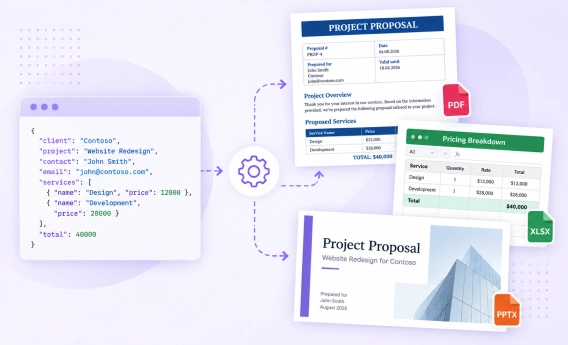
Adding document automation could significantly help your business to grow. You may not see its benefits at once, but when you start automating documents, you understand how much time it saves, how it speeds up your communications, and makes documentation more accurate and error-free.
Using plumsail we have managed to automate these processes and send emails/ save documents to the shared library without having to do anything. This helped our team cut back time spent formatting responses and has increased productivity.
Emma Hindley, Head of Knowledge & Innovation at Erevena
We got inspired by how our customers automate their paperwork using Plumsail Documents and Zapier and decided to pick up the most popular ways of automating documents in Zapier and share them.
Airtable allows you to create and share relational databases and build collaborative apps for various needs. In Airtable, you can track projects and campaigns, manage products, orders, and contacts, and do much more! Look like Airtable is one of the most flexible platforms!
Ways to automate document generation from Airtable are endless. It could be simple invoices and contracts, or complicated fillable forms, depending on your needs.
Being able to tie Plumsail to Airtable via Zapier is absolutely fantastic in generating the many documents required to arrange visa applications for foreigner laborers coming to Japan.
I love that the Word markup can easily support list objects that I pass to Plumsail Documents with Zapier. This allows me to create reports from multiple Airtable tables.
Selling your products and services using Shopify? Then you might have already felt that limitation when it comes to customizing payment documents such as invoices and receipts. The solution is here - connect Shopify to Plumsail Documents in Zapier and automatically send documents from Shopify to your customers.
If you're running online courses and would like to automate creating and sending diplomas on course completion, try this Zapier automation for Plumsail Documents and Teachable. It would do all work for you without any manual interruption.
With Wufoo forms, you can create and embed registration, application, lead capture, and other forms onto your site. With Plumsail Documents and Zapier, you can easily merge Wufoo form submission data into ready completed documents.
Hubspot CRM is a great tool to automate the entire sales pipeline. A cool addition to it will be Plumsail Documents, so you can populate your sales documents such as proposals, contracts, invoices, and more with data from Hubspot CRM.
Instantly generate customized business documents using Typeform entry data. Typeform is a popular and powerful form builder that many people use to collect data. It's a quite common request to transform Typeform entry data into beautiful documents. Here is when Plumsail Documents and Zapier come in handy.
Automatic quoting customers make the chances they will turn into paying customers much higher. Make life easy for your sales team and set up the automated generation and sending of sales quotes. Use this Zapier automation with JotForm and Plumsail Documents.
Using Smartsheet, you may face with limitations of its document builder. Instead of that, you can use Plumsail Documents. Connect it to Smartsheet in Zapier to instantly populate your business forms.
Whenever a new sales order is placed in Zoho CRM, a branded invoice is automatically generated and sent to your customers. Sounds great, doesn't it? It's easily achievable with Plumsail Documents connected to Zoho CRM in Zapier. Actually, a similar approach will work for any business documents you need to generate from Zoho CRM data.
This one will be useful for those who use Google Suite to operate business processes. Often Google Docs templating solution is not enough for complex-structured documents. With Plumsail Documents, you will easily create custom documents with tables, lists, images, and more from your Google Spreadsheets and Forms.
Above are just a few examples you can use to automate your document workflows using Zapier. Learn how to use Plumsail Documents in Zapier and create your own workflows with your favorite apps and services.
By the way, we'd be happy to know your use cases. Feel free to share them in the comments.
Related posts
DocumentsFormsSharePointPower Automate
Sep 17
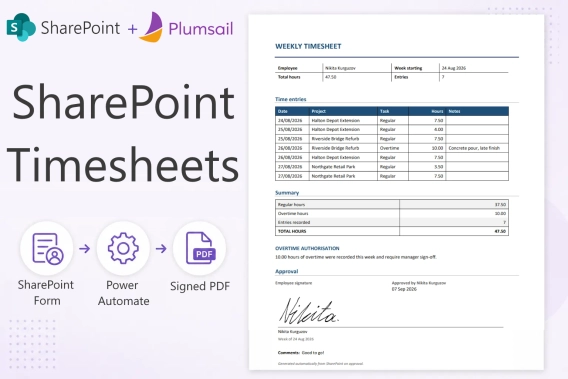
SharePoint timesheet: track hours, approve, and export to PDF
Build a SharePoint timesheet system with weekly hour entry, project totals, e-signatures, approvals, and automatic PDF generation. Full setup with code.
Nikita Kurguzov
Customer Support Engineer
Documents
Sep 14
Generate a set of documents from one data source using multiple templates
Use multiple templates in a single Plumsail Documents Process to generate Word, Excel, PowerPoint, PDF, and HTML files from the same data.
Angelika Cherina
Lead Marketing Specialist
DocumentsSharePointPower Automate
Sep 08
How to export multiple SharePoint list items to one Word document
Learn how to export multiple SharePoint list items to one Word or PDF document with Power Automate, including repeating table rows and images.






 Documents
 FormsSharePoint
 Power Automate