This business case was shared by DOWC, a finance & insurance (F&I) solutions provider, and Jake LaMotta, an IT Specialist at the company, who implemented Plumsail HelpDesk for SharePoint to replace fragmented email support and improve request management.
As the company grew, email-based support became difficult to manage, with requests scattered across multiple inboxes and limited visibility for the team. They needed a centralized system, and Plumsail HelpDesk for SharePoint, together with Forms and Power Automate, provided the structure to organize dealer inquiries, automate workflows, and standardize processes.
With more than 20 years of experience, DOWC is a trusted industry leader in providing vehicle protection and finance insurance products that serve both franchise and independent automotive dealerships across the United States, Canada, and South America.
DOWC combines deep industry expertise with advanced administration and compliance capabilities to deliver specific solutions that support dealer partners and enhance customer satisfaction. The company is known for its transparent approach, award recognition from dealer votes, and strong focus on service excellence.
Challenge: Email support lacking structure, SLAs, and reporting
Before implementing Plumsail HelpDesk, our team relied on shared email inboxes to communicate with clients and manage task notifications. As the volume of requests grew, this approach made it increasingly difficult to maintain visibility, prioritize inquiries, and ensure consistent processes across departments.
The main challenges that slowed down our workflow included:
Decentralized communication: Each department had its own inboxes making it difficult to track and assign requests.
Lack of workflow control: There was no way to enforce SLAs or standard procedures across teams.
Limited reporting: Collecting and analyzing customer feedback was cumbersome.
Customization needs: We wanted the ability to customize processes, forms, and notifications to fit our operations.
Solution: Implementing Plumsail HelpDesk with custom workflows
We were looking for a cost-effective solution that would still offer a high level of personalization and customization. Plumsail HelpDesk met these requirements, and we adopted it as the main system for managing customer communication.
We connected our existing mailboxes to the HelpDesk system so that all requests from website contact forms are automatically converted into tickets. Using the HelpDesk API, Power Automate, and Plumsail Forms, we implemented custom workflows to enforce rules, automate lifecycle steps, and improve visibility across departments.
I've been working with this system for a while now, and I find it very easy to work with. The UI is great, and any changes my team wants to make to the views have been handled by the IT team. I like that it lives in SharePoint, so I never have to log in to a separate service and everything feels very familiar.
DOWC Support Team
How we organize a ticketing system for SharePoint Online
To make the ticketing process clear and efficient, we structure it with several key components.
Ticket queues and multiple connected mailboxes
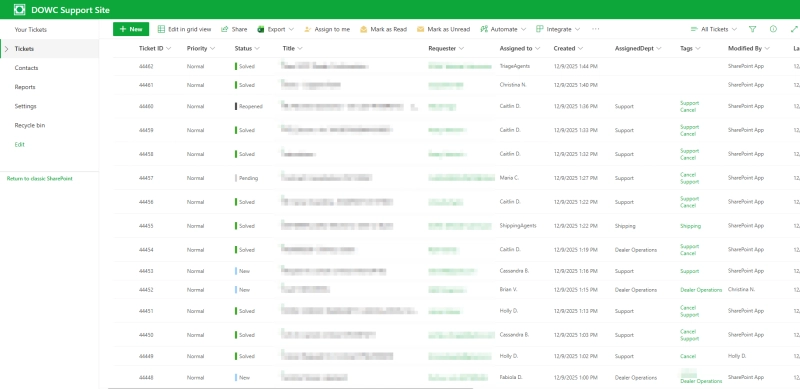
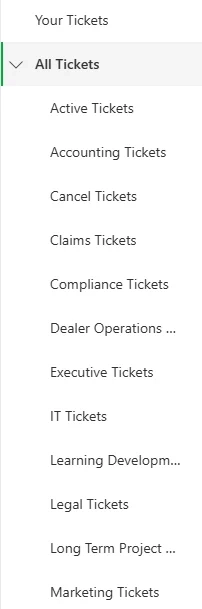
Engineers have an overview of all tickets in the system, divided into individual and overall queues.
We have approximately 20 mailboxes connected to our HelpDesk instance, and the email addresses for them are connected to all of our contact forms on our websites.
Requester field handling with the HelpDesk API
We utilize the HelpDesk API to automatically replace the requester field in a new ticket with the email address that was input by an end-user on the various forms on our website.
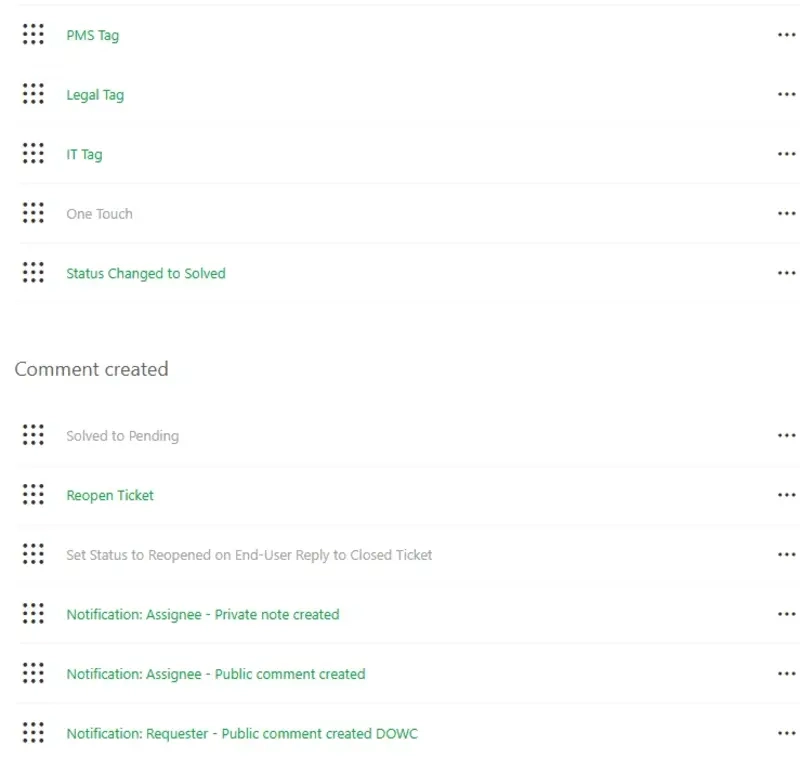
Automation with Power Automate
We utilize Power Automate flows to accomplish many tasks. These include:
Sending customer satisfaction surveys four days after a ticket is resolved if no reply is received.
Moving tickets from "Solved" to our custom "Closed" status after four days to prevent them from being reopened.
Setting column values based on specific conditions. For example, one flow marks the "OneTouch" column as "Yes," while another records the resolution date in the "ResDate" column. This metadata is later used in triggers, additional flows, and reporting.
Monitoring helpdesk mailboxes to avoid Microsoft Exchange limits. While rare, mailboxes being flagged for high email volume can cause significant disruption, so we run a weekly flow to test all 20 mailboxes and ensure everything operates smoothly.
Custom HTML email responses that automate signatures and remove the need for agents to add them manually.
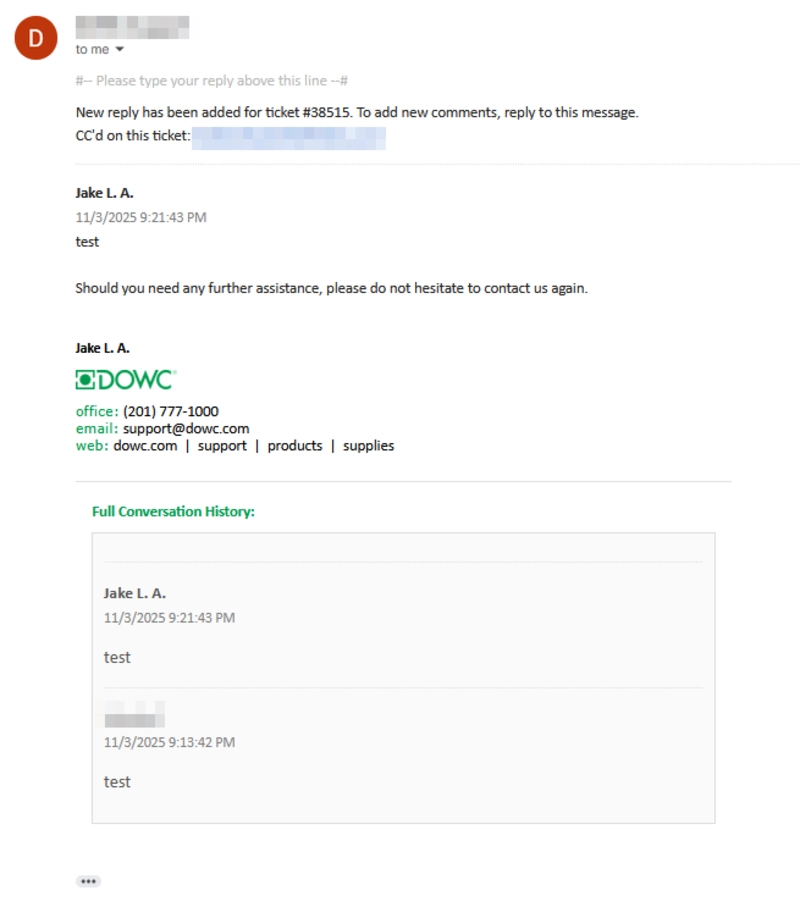
Ticket email customization, including adjusting the ticket layout, adding CCs to keep end-users informed, and condensing previous conversations to make emails more compact and easier to read.
We thought previously that some of these modifications weren't possible, but with enough effort, we were able to find a solution to each of our email formatting-related issues.
Customizing ticket handling rules with Plumsail Forms
We use Plumsail Forms to control how tickets are processed. For example:
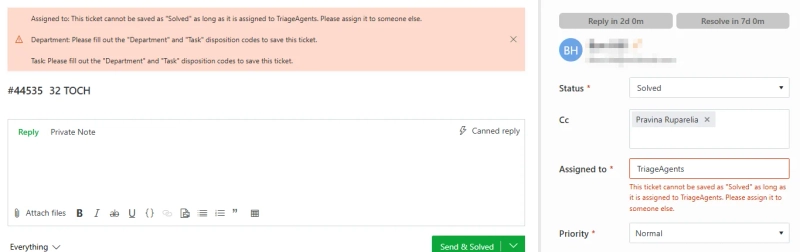
Preventing agents from marking a ticket as solved when a certain group is the current assignee.
Preventing agents from marking a ticket as solved when certain disposition codes haven't been filled out.
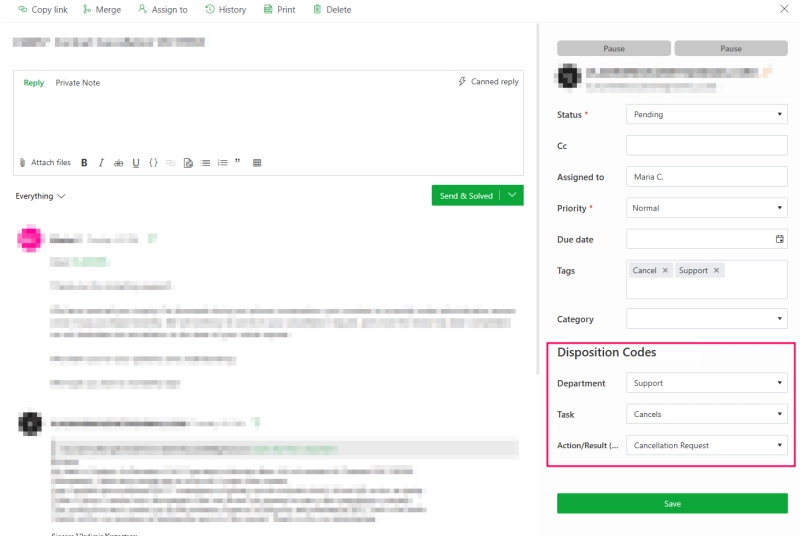
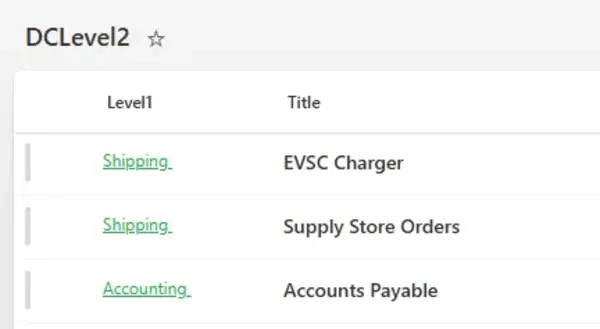
We have added disposition codes to the ticket form, and have required users fill in the "Department" and "Task" disposition codes before solving a ticket.
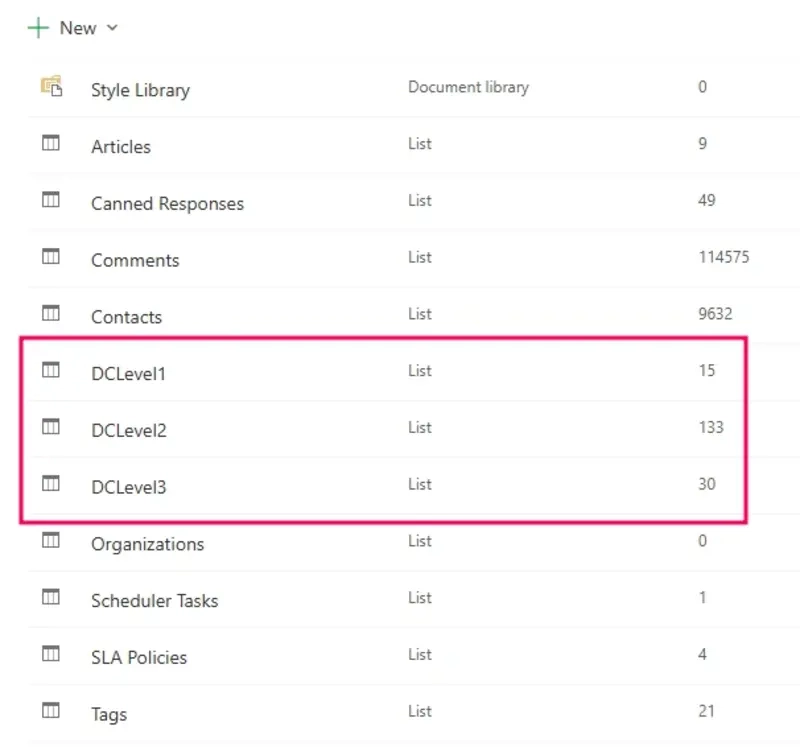
We created simple SharePoint lists that hold the codes we want to add to tickets, and it links them to certain departments. This makes pulling this data when doing reporting very easy.
Allowing agents to change the HelpDesk mailbox when manually creating a new ticket so that the mailbox sending out the emails is the correct one.
Changing the "Send &" button to our most-used status.
Analytics and reporting
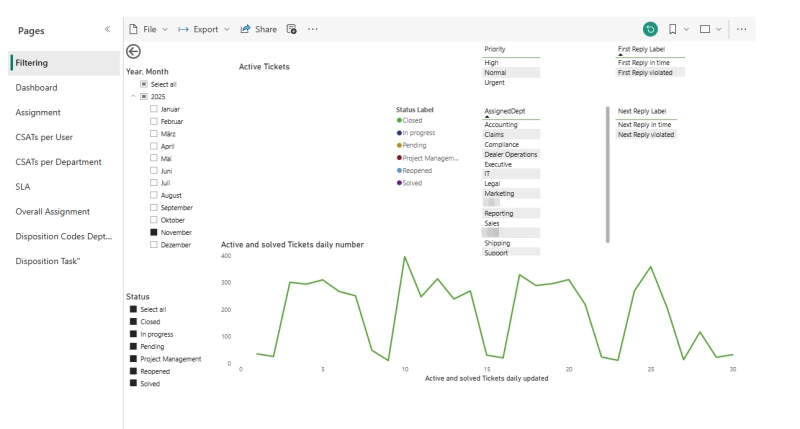
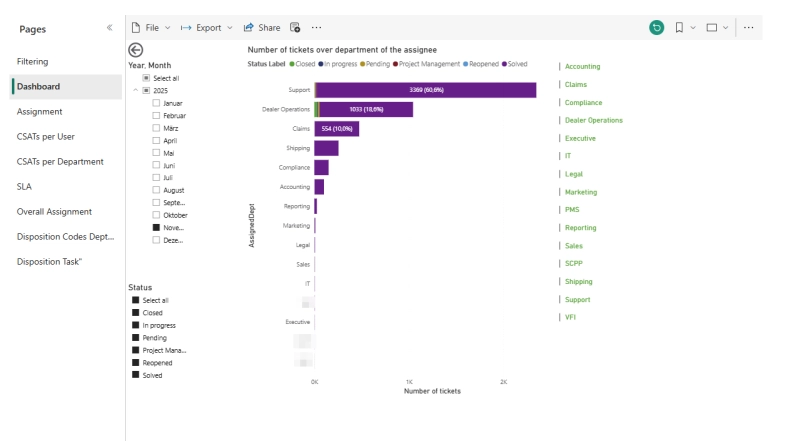
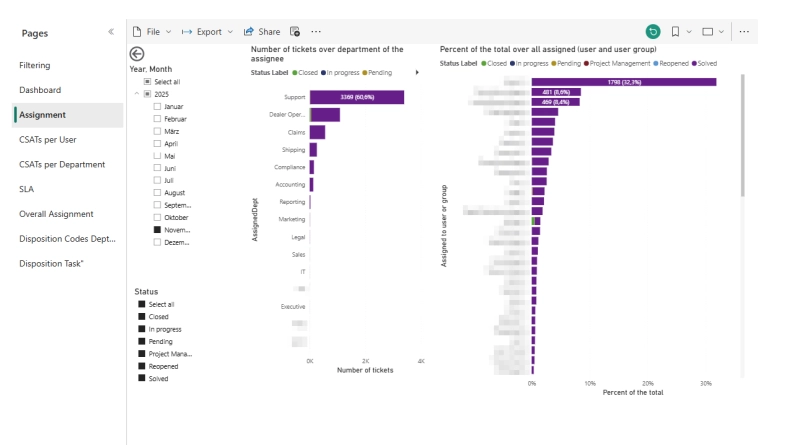
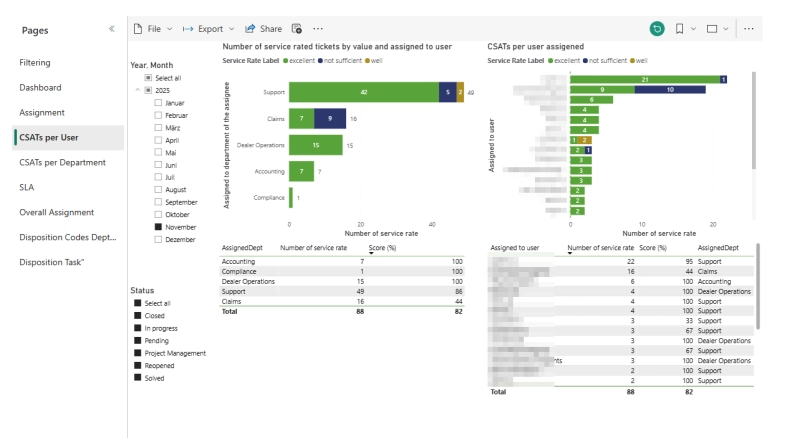
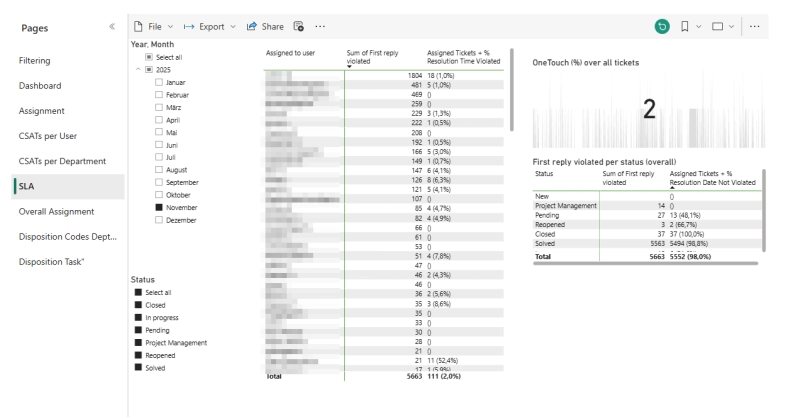
We have extensive reporting set up that allows us to get a full overview of how our agents are doing.
We have utilized Power BI in conjunction with column values, the SharePoint lists native to Plumsail HelpDesk, and Power Automate flows to achieve these reporting goals.
We worked with an outside vendor and our own internal reporting staff members to present the correct data in a palatable manner.
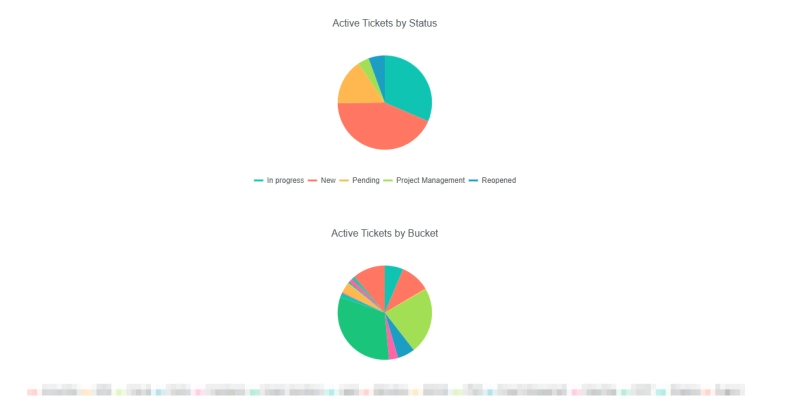
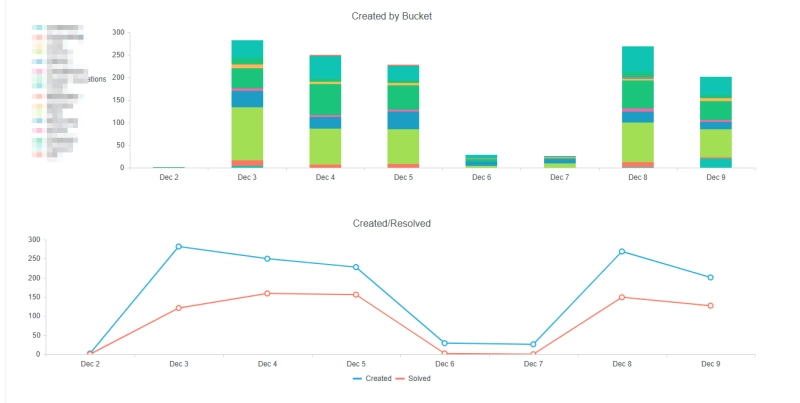
We have also delved into Dashboard Designer to design our more straightforward day-to-day reporting.
Dashboard Designer seems to be very powerful and we have yet to fully dive in, but from what we can see, it provides a lot of value and is pretty essential for any well-realized Plumsail HelpDesk instance.
This system has many of the hallmarks of DIY. Making it in your image can be difficult and frustrating at times, but with enough effort and time commitment, you can make a system that is tailored to your needs and is very powerful. We have specific needs and Plumsail HelpDesk allows us to check off every box.
Jake LaMotta, DOWC IT Specialist
Benefits of choosing Plumsail HelpDesk for SharePoint Online
After implementing a ticketing system, we now manage all customer and dealer requests through a centralized system instead of separate email inboxes.
Our mailboxes are connected to the platform, and all submissions from website contact forms automatically generate tickets with the correct requester information.
Another important reason for choosing Plumsail HelpDesk was the ability to combine it with Plumsail Forms and SharePoint Forms Designer. This combination opened up additional possibilities for customizing workflows, forms, and processes to better fit our needs.
We also run most of our day to day workload on Microsoft 365. Because of this, the direct integration with SharePoint Online was a major factor.
It made the onboarding process very smooth and allowed us to work within an environment that was already familiar to the team.
I like this system. It's easy to manage and customize. It's not the most powerful system in the world, but it is made up for by the amount of freedom you are afforded with it. The price is amazing, and I hope the Plumsail team continues to make it better and better!
Feel free to book a call with our team if you have any questions or need assistance to get started.
Related posts
Customer storyFormsMicrosoft 365SharePoint
Sep 01
Manage construction logistics in SharePoint with Plumsail Forms
Discover how Profibaustoffe CZ manages construction logistics in SharePoint Online — orders, silos, transport, and invoicing connected with Plumsail Forms.
Štěpán Širůček
Sharepoint developer | M365 Consultant at Pinya365
Customer storyFormsSharePointPower Automate
Jul 14
Risk management in SharePoint: CWP Global's centralized system
Learn how CWP Global replaced scattered spreadsheets with a centralized SharePoint risk management system using Plumsail Forms, Power Automate, and automated scoring and escalation.
Dessislav Shekerletov
Head of IT and Process Improvement at CWP Global
Customer storyDocumentsMake
May 21
How Oil-Royalties automated agreement generation and e-sign workflows
Learn how Oil-Royalties used Plumsail Documents with Jotform, Make, and Dropbox Sign to automate agreement generation and deliver pre-filled e-sign agreements.
Ronald Achs
Founder and Chief Executive of PRODUITS DE L’EQUIPE LLC







 FormsMicrosoft 365SharePoint