 Documents
May 20, 2021
Generate documents from premade templates now available in the Plumsail account
Plumsail Documents got a library of ready-to-use document templates
 DocumentsSharePoint
 Power Automate
In this post, you'll learn how payment QR codes simplify invoice payments and explore the most common payment QR code standards used in Europe. You'll also see how to generate invoices with EPC QR Codes (Girocode) and Swiss QR Bills automatically using Plumsail Documents.
We'll also look at common business use cases and answer some frequently asked questions about payment QR codes.
In this article:
Adding a payment QR code to an invoice makes it easier for customers to pay and helps businesses reduce manual work. Instead of typing payment details such as the IBAN, reference number, and amount, customers can scan the QR code using their banking app.
Here are the key benefits of adding payment QR codes to invoices:
This helps avoid mistakes that can happen when payment details are entered manually. Even a small typo in an account number or payment reference can delay a payment or send it to the wrong destination. With a payment QR code, all payment information is transferred automatically.
Payment QR codes can also help businesses get paid faster. The payment process becomes much simpler for customers, which means fewer abandoned payments and less time spent entering payment details.
They also improve the customer experience. Most people are already familiar with scanning QR codes from their phones, and many banking apps can process payment QR codes automatically. Instead of switching between documents and banking applications, customers can pay directly from the invoice.
Finally, payment QR codes also support invoice automation. They can be generated automatically together with invoices, ensuring accurate payment information in every document.
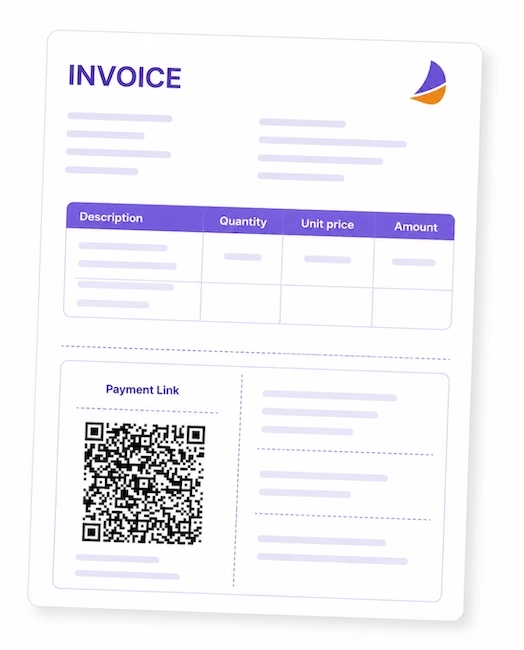
Not all payment QR codes are the same. Different countries and banking systems use different standards to ensure that payment information is transferred correctly between invoices and banking applications.
Two of the most common payment QR code formats used in Europe:
While both are designed to simplify payments, they are intended for different banking systems and regions.
An EPC QR Code is a payment QR code standard developed by the European Payments Council (EPC) for SEPA bank transfers. It allows businesses to include payment details directly in invoices and other payment documents.
EPC QR Codes are often called Girocodes, especially in Germany and Austria, where the format became widely adopted for bank payments. Today, both names are commonly used to describe the same payment QR code standard.
An EPC QR Code can contain:
When customers scan the code with their banking app, all payment details are filled in automatically, making the payment process faster and reducing the risk of errors.
EPC QR Codes are widely used across SEPA countries, including Germany, Austria, Belgium, the Netherlands, France, Portugal, Spain, Finland, Ireland, and many other countries.
They are commonly added to invoices, payment reminders, membership fee notices, donation requests, and other payment documents.
Swiss QR Bills are the official payment standard used in Switzerland and Liechtenstein. They were introduced as part of the modernization of the Swiss payment system and replaced the traditional Swiss payment slips previously attached to invoices.
Unlike standard QR codes that can store almost any type of information, Swiss QR Bills follow a strict format defined by Swiss financial institutions.
The QR code contains structured payment data and is usually displayed together with a dedicated payment section at the bottom of an invoice.
Using the official Swiss QR Bill format ensures compatibility with local banking systems and allows customers to make payments quickly and accurately.
Only specific currencies are allowed for this type of payment:
Like EPC QR Codes, Swiss QR Bills can be generated automatically in Plumsail Documents using data from SharePoint, CRM systems, ERP software, accounting platforms, and other business applications.
Let's see how to generate invoices with a Swiss QR Bill automatically using Plumsail Documents and Power Automate. In this example, a new invoice will be generated and emailed automatically whenever a new payment record is added to a SharePoint list.
The first step is to set up a Documents process and prepare a Word template that contains your invoice layout and a Swiss QR Bill placeholder.
Log into the Plumsail Documents account
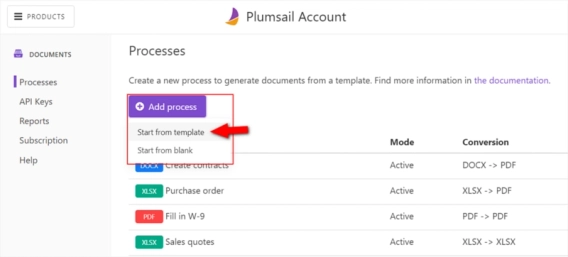
In the Processes section, click Add process → Premade template
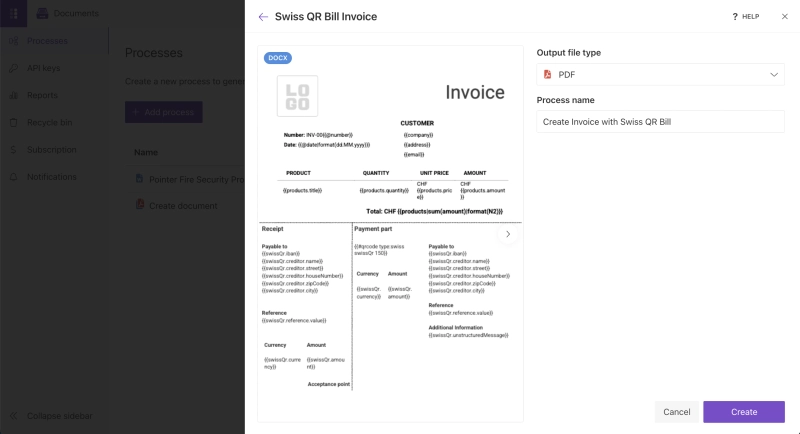
Select Swiss QR Bill Invoice template
Give the process a name and choose an output file type
You can also start from scratch and upload your own document template. Add tokens for dynamic data to turn it into a reusable template for future document generation.
Open the template and customize it as needed. The template already contains a section for the Swiss QR Bill and all the required placeholders.
If you're creating your own template from scratch, make sure it follows the official Swiss QR Bill specification. The payment section has a predefined layout, and the QR code requires a specific data structure to be generated correctly.
To populate the template with data from another system, add tokens wherever dynamic values should appear.
The finished template could look like this:
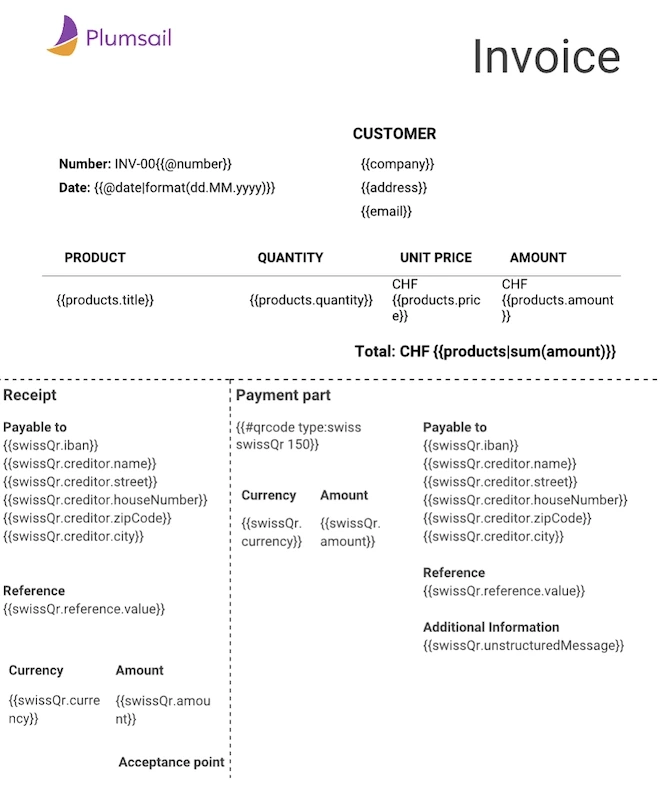
Next, let's configure automatic email delivery for the generated invoice. To do this, add delivery action to the process.
Click Delivery in the left panel
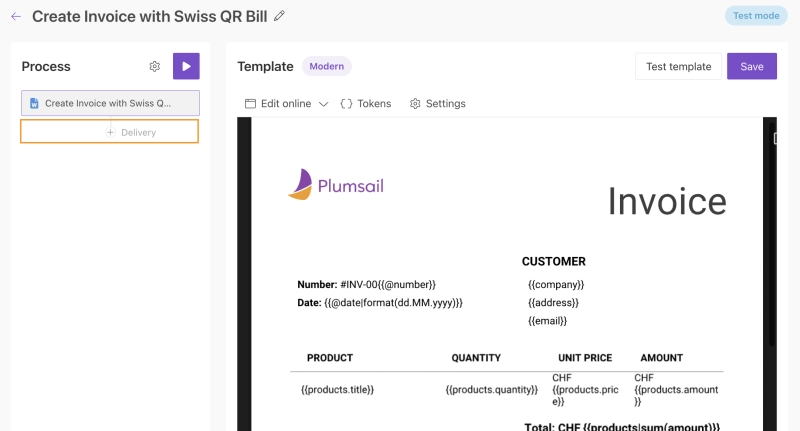
Select a suitable email service (for example, SMTP)
Configure the recipients, subject, and email body
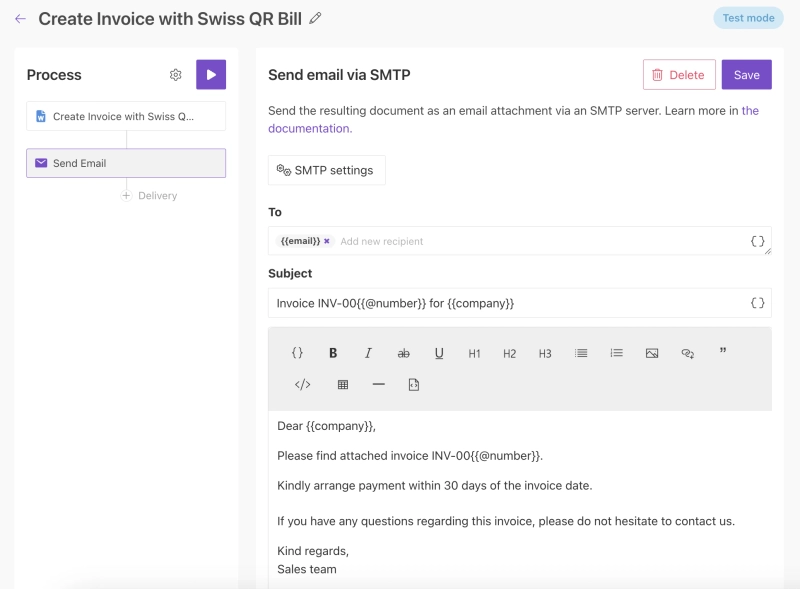
After that, test the template document using sample data. Once you're satisfied with the results, switch the process to Production mode.
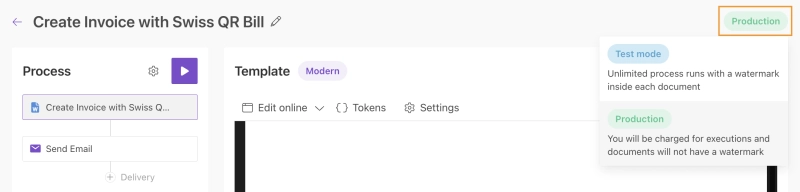
After switching the process to Production mode, the document generation process is ready. The remaining task is to provide invoice data and trigger the process automatically.
In the next step, we'll build a Power Automate flow that collects invoice data, generates the PDF invoice, and sends it to the customer using the delivery configured above.
For this example, we'll use a SharePoint list as the data source. However, the same approach works with many other data sources, including CRM systems, ERP platforms, databases, and accounting software.
Each new list item represents a new invoice and contains information such as the customer name, email address, and product details. The Swiss QR Bill configuration is stored in a separate file. Power Automate combines data from both sources and passes it to Plumsail Documents for invoice generation.
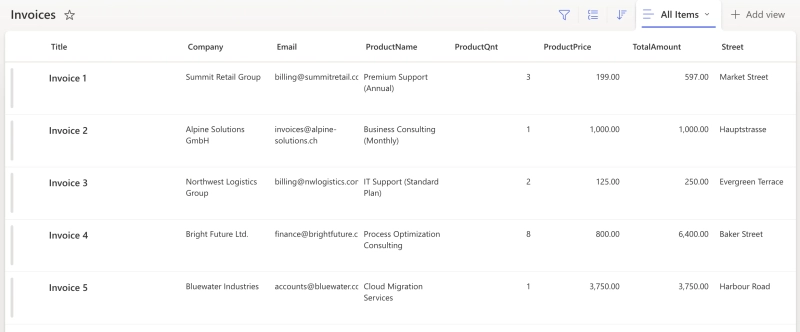
Create a Power Automate flow using the When an item is created SharePoint trigger. This flow will run automatically every time a new invoice record is added to the list.
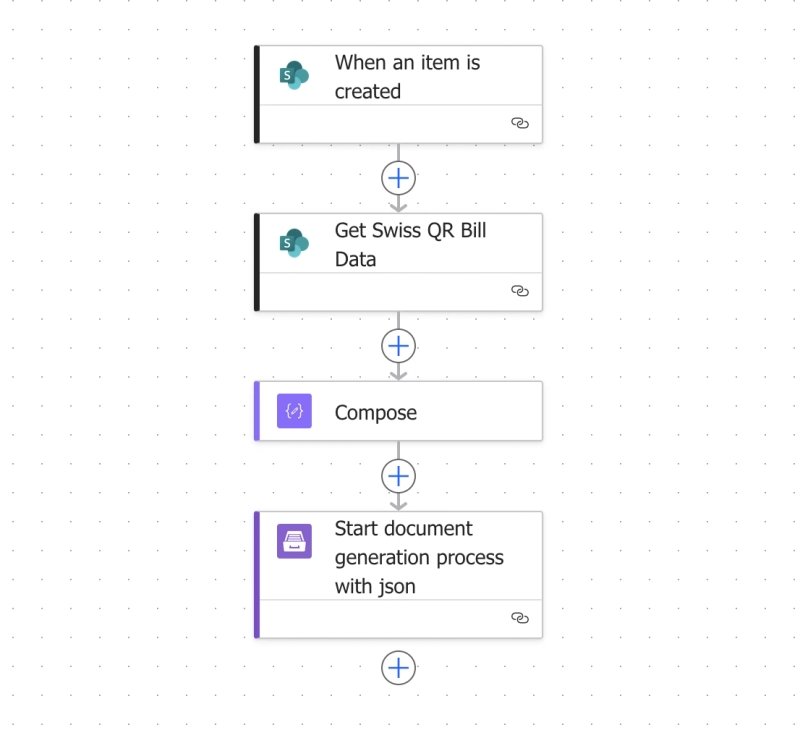
Next, collect and prepare the data required for the invoice. The flow retrieves the Swiss QR Bill configuration from the JSON file, takes the invoice details from the SharePoint trigger, and combines both sets of data into the structure expected by the document template.
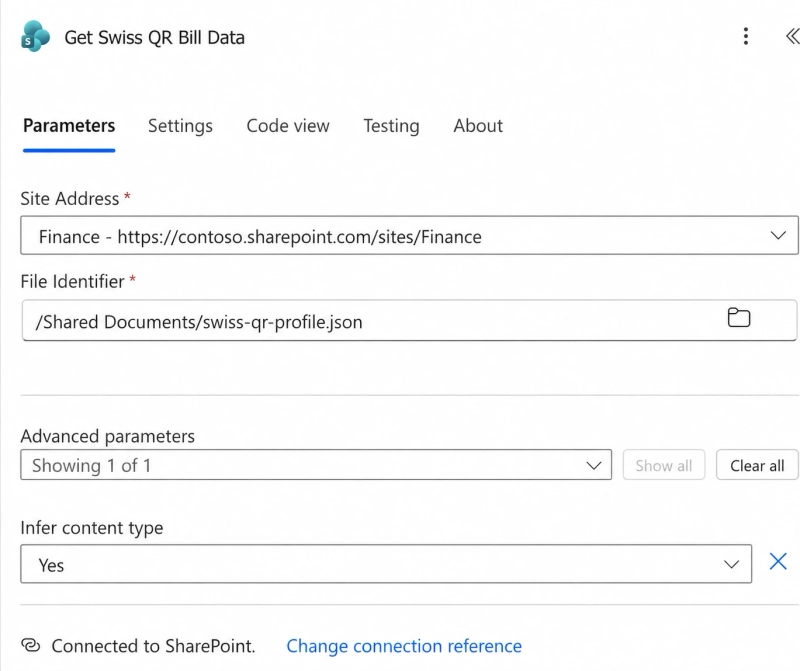
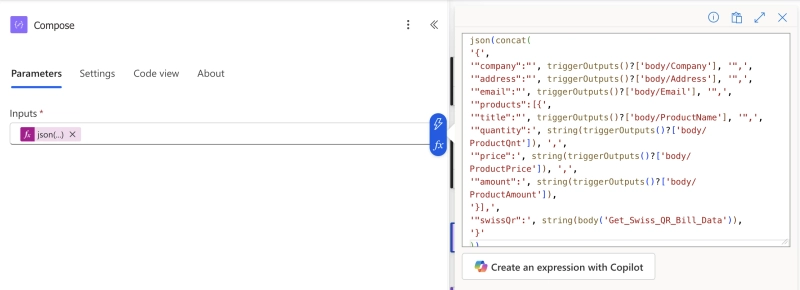
The Swiss QR Bill format is defined by the official specification and must follow a specific structure. The JSON payload prepared in the Compose action should contain a value similar to the following:
{
  "swissValue": {
    "ibanType": "QrIban",
    "iban": "CH5830000000000000000",
    "currency": "CHF",
    "amount": 3750.00,
    "creditor": {
      "name": "Alpine Solutions GmbH",
      "street": "Hauptstrasse",
      "houseNumber": "12",
      "zipCode": "8000",
      "city": "Zürich",
      "country": "CH"
    },
    "reference": {
      "type": "QRR",
      "value": "990005000000000320071012303"
    },
    "debtor": {
      "name": "Max Mustermann",
      "street": "Musterweg 2",
      "houseNumber": "5",
      "zipCode": "3000",
      "city": "Bern",
      "country": "CH"
    },
    "unstructuredMessage": "Rechnung INV-0011"
  }
}Then select your process and add the output of the Compose action to the Template data field. This passes the complete JSON payload, including the invoice details from SharePoint and the Swiss QR Bill configuration from the JSON file, to Plumsail Documents.
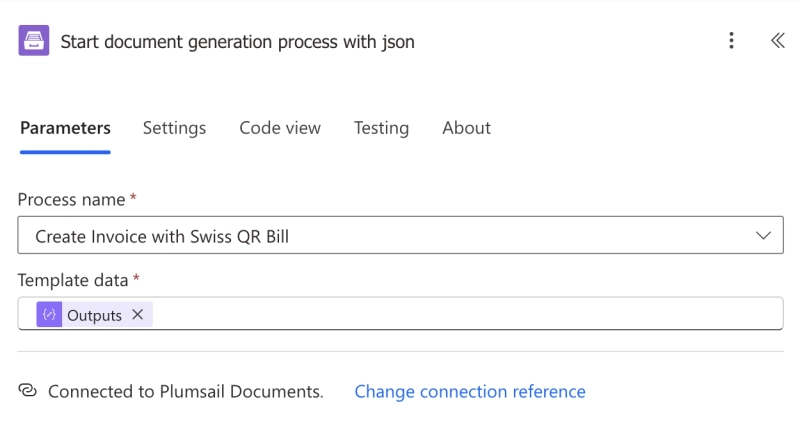
Once the flow is saved, the process becomes fully automated.
When a new item is created in the SharePoint list, Power Automate sends the invoice data to Plumsail Documents. The invoice is generated automatically, converted to PDF, and delivered using the email delivery configured in the process.
The customer receives an email with the generated invoice attached:
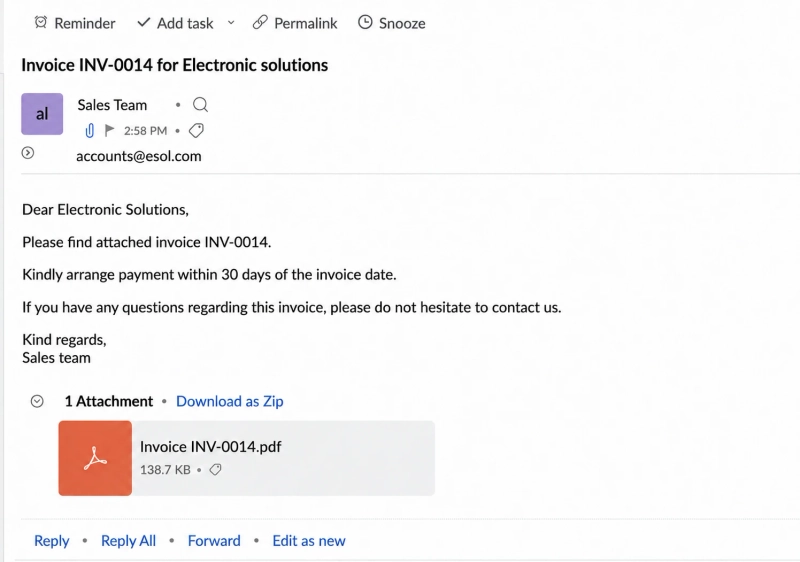
Opening the attachment shows the completed invoice with the generated Swiss QR Bill:
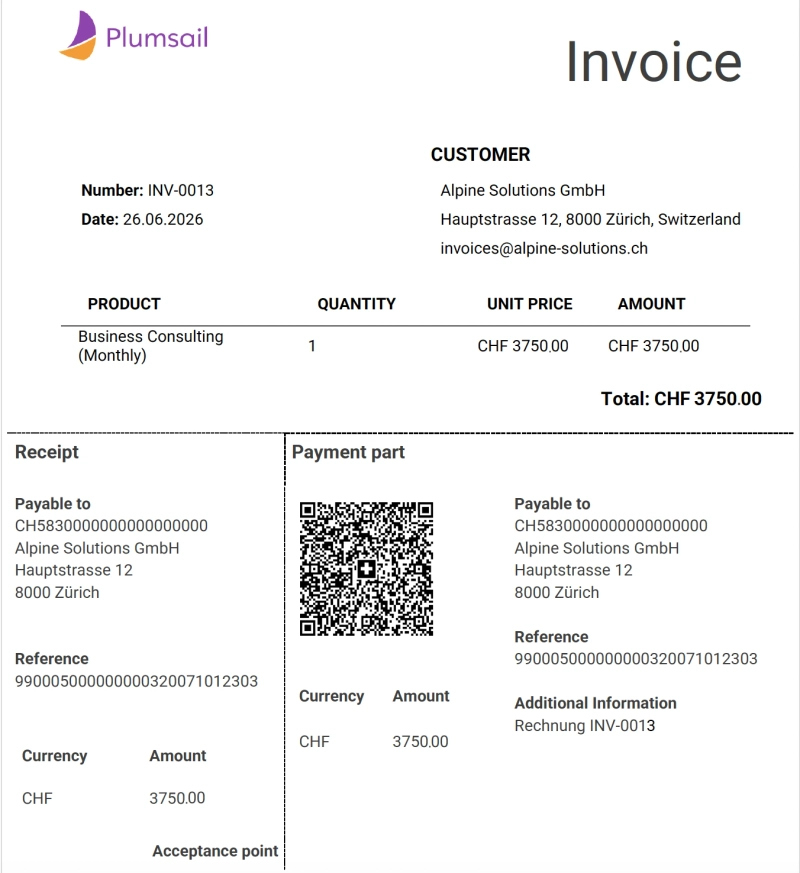
You can use this workflow with many other data sources as well. These include CRM systems, ERP platforms, accounting software, databases, and other business applications connected through Power Automate, Make, Zapier, or similar integration platforms.
The same approach can be used for EPC QR Codes (Girocode). The only difference is the QR code format and the payment data required by the template.
Payment QR codes can be used in many types of business documents. Whether you're generating invoices, collecting membership fees, or sending donation requests, QR codes make payments faster and more convenient for recipients.
Customer invoices are one of the most common use cases for payment QR codes. By adding an EPC QR Code or Swiss QR Bill directly to the invoice, businesses can make the payment process much easier for their customers.
Instead of manually entering payment details, customers can scan the QR code with their banking app and pay immediately. This helps reduce payment errors and can lead to faster invoice payments.
Payment reminders are often more effective when they include a payment QR code. Customers can pay quickly without searching for the original invoice or entering payment details manually.
Generating payment reminders automatically with an updated payment QR code helps streamline collection processes and improve payment completion rates.
Non-profit organizations and charities can use payment QR codes in donation letters and fundraising campaigns. Supporters can scan the QR code and make a contribution in seconds, creating a smoother donation experience.
This is especially useful for printed donation letters, email attachments, and PDF fundraising materials.
Organizations, clubs, associations, and subscription-based businesses can add payment QR codes to membership fee notices and subscription invoices.
By simplifying the payment process, organizations can reduce administrative work and encourage timely payments from members and subscribers.
Utility providers, telecommunications companies, maintenance services, and other service-based businesses often generate large volumes of invoices. Payment QR codes make payments easier for customers and support automated invoicing.
When invoices are generated automatically from SharePoint, CRM platforms, or billing software, payment QR codes can be generated automatically as well, ensuring accurate payment information in every document.
A standard QR code can store almost any type of information, such as website URLs, contact details, or payment information. A Swiss QR Code is a specialized payment QR code used in Switzerland that follows official banking requirements and contains structured payment data for Swiss payment systems.
An EPC QR Code is a payment QR code standard developed by the European Payments Council (EPC) for SEPA bank transfers. Its format is defined in the official EPC QR Code Guidelines.
It contains payment information such as the recipient's IBAN, payment amount, reference number, and payment message. EPC QR Codes are commonly used across many European countries and are often referred to as Girocodes.
A Swiss QR-bill is the official payment standard used in Switzerland. It combines an invoice with a payment section containing a Swiss QR Code. Customers can scan the code with their banking application to automatically transfer payment information and complete the payment.
Yes. Plumsail Documents supports both EPC QR Codes (Girocode) and Swiss QR Bills. The QR code type depends on the payment data and template you use. See the documentation for EPC QR Codes and Swiss QR Bills to learn how to configure them.
Payment QR codes make invoices easier to pay, help reduce errors, and support document automation.
With Plumsail Documents, you can automatically generate payment-ready documents from Word templates using data from SharePoint, CRM systems, ERP platforms, accounting software, and other business applications.
Supported QR code formats include:
Ready to automate your invoices and payment documents? Try Plumsail Documents with a 30-day free trial.
Have questions or would like to discuss your use case? Book a free call with our team.
DocumentsSharePointPower AutomateDocumentsPlumsail Documents got a library of ready-to-use document templates
DocumentsPower AutomateZapierNew features for Plumsail Documents fillable PDF templates.