Sharepoint developer | M365 Consultant at Pinya365
Pinya365 is a Plumsail partner, and in this article Štěpán Širůček shares how his team digitized construction logistics for Profibaustoffe CZ using SharePoint Online and Plumsail Forms - Plumsail
I'm Štěpán Širůček, SharePoint developer and M365 consultant at Pinya365, a Czech software house building intranet and business solutions on the Microsoft 365 platform. In this case study, I'll walk you through a construction logistics system we developed for Profibaustoffe CZ, s.r.o., a supplier of construction materials to the Czech Republic, Slovakia, Hungary, Poland, and Croatia.
The challenge: logistics data scattered across Excel, email, and network drives
Profibaustoffe CZ coordinates dozens of jobs every day: silos moving between construction sites, bulk and bagged material deliveries, tanker and silo truck scheduling, and the invoicing that follows. Bulk material logistics leaves little room for error — a silo delivered to the wrong site or material that isn't billed correctly costs both money and customer trust.
The problem wasn't a lack of data. It was that the data lived in too many places. Job details sat in Excel workbooks, delivery confirmations in email threads, and supporting documents on network drives. Employees spent their time searching for information, retyping it from one place to another, and checking which version was actually the current one.
The hardest part was connecting jobs to everything attached to them: silo movements, material consumption, transport, and invoicing. Each part of the process had its own records, so people regularly worked with incomplete or outdated information.
The goal was to create one place that links all the key logistics processes together — so that data is entered once, propagates everywhere it's needed, and the whole team always sees the current state of a job!
The solution: a logistics module on SharePoint Online
We built a logistics module on Microsoft SharePoint Online that covers the full lifecycle of a job. The system now handles:
job and order records,
silo movements between construction sites,
pouring schedules,
tarpaulin and tanker management,
drivers and vehicle fleet records,
customers and business partners,
handover to invoicing.
The individual parts talk to each other. Information is entered once and is written across the system automatically.
SharePoint as a single hub for construction logistics
The job is the central record everything else hangs off. From a single place, users reach silo transfers, pouring plans, transport, customers, and the complete movement history.
All the data is linked, so any change is immediately reflected wherever it matters. The team works with current information, duplicate data entry disappears, and logistics planning becomes both faster and easier to follow.
Job forms built with Plumsail Forms
To make the system comfortable to work with day to day, we built the user interface with Plumsail Forms for SharePoint. That let us shape the forms around how people at the company actually work, rather than around how a SharePoint list is structured.
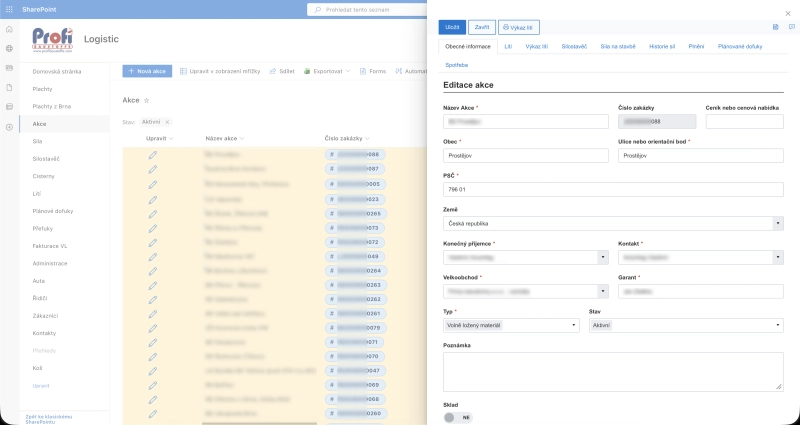
Each job opens in a panel directly from the list view, with details split across tabs. These include general information, pouring, pouring reports, silo trucks, silos on site, silo history, filling, planned top-ups, and consumption.
Everything a dispatcher needs is one click away, and nobody has to navigate between separate lists to get the full picture.
The job form opens in a panel over the list view. The tabs across the top — pouring, silo trucks, silos on site, silo history, planned top-ups, consumption — hold everything connected to that job.
The forms fill in the details they can work out on their own, validate required fields, and pull in related information from across the system. Customers and contacts come in through Lookup controls instead of free text. Company details are loaded automatically from the Czech business register (ARES) based on the company ID number. Employees don't have to think about where a piece of information belongs or whether they've missed something. They fill in the form and the system takes care of the rest.
Tracking material consumption on every job
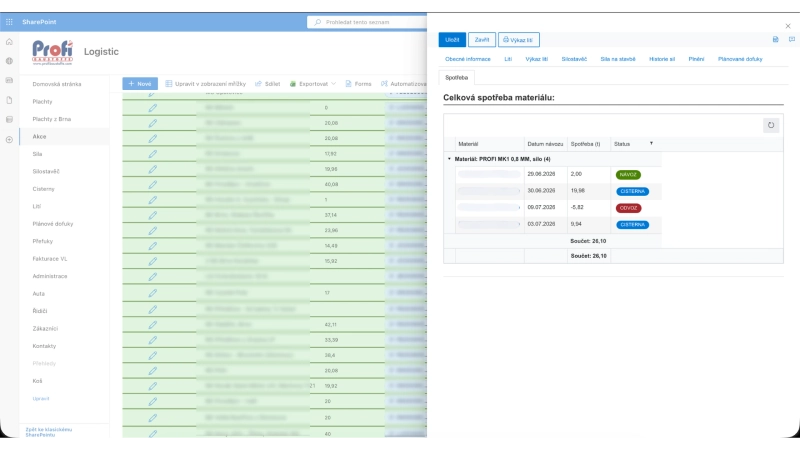
Material movement is where the system earns its keep. The consumption tab shows every delivery, tanker fill, and collection recorded against a job, grouped by material and silo, with running totals in tonnes.
Material consumption grouped by material and silo. Each row is a movement — a delivery (návoz), a tanker fill (cisterna), or a collection (odvoz) — and the totals recalculate as movements are added.
These records come from a related SharePoint list and are displayed on the job form through the List or Library control, so dispatchers add and edit movements without leaving the job. A single button also generates a printable pouring report straight from the form, which is what the drivers and the site take away with them.
Results: what changed for Profibaustoffe CZ
After the system went live, Profibaustoffe CZ gained:
one set of records for jobs, silos, and transport
far less manual retyping of data
an immediate overview of the status of every job
a full history of material movements
better cooperation between sales, dispatch, and transport
clearer logistics planning
The biggest benefit, though, is that every team now works from the same data. A job, a silo status, and a planned transfer are no longer three separate sets of records — they're one connected system.
We keep track of material transfers between construction sites in one place, monitor consumption, and can process invoicing faster thanks to the information entered in the forms.
Managing silo transfers from the warehouse to construction sites is now much easier for us. We can always see the current location of each silo, quickly check where material is being delivered that day, or see how much material has been used on a particular project over the course of the year.
Miroslav Lengyel, Logistics Specialist for bagged and bulk materials at Profibaustoffe CZ
Technologies behind the solution
We built the project on proven Microsoft 365 technologies:
Microsoft SharePoint Online — the central application and data storage
Plumsail Forms — forms, validation, and the user interface
ARES — automatic lookup of company details from the Czech business register by company ID
Conclusion: SharePoint is more than document storage
The Profibaustoffe CZ project shows that SharePoint isn't just a place to keep files. It can become a full business application that connects sales, logistics, and transport into a single system. With the processes digitized, employees always have current information, spend less time on administration, and have more time for work that actually moves the business forward.
Get started with Plumsail Forms for SharePoint
If you want to try the product yourself, start a 30-day free trial of Plumsail Forms for SharePoint Online by following the installation instructions in our documentation, which include a full video walkthrough.
And if you're looking for a ready-made solution for your own logistics or operations processes, get in touch with Pinya365.
Related posts
Customer storyFormsDynamics 365
May 11, 2023
On-site construction forms with Dynamics 365 integration using Plumsail Forms
How LDD Construction Ltd operatives use Plumsail forms on-site to record daily works, with direct integration and data loading from Dynamics 365.
Viorel Boeru
Operations Assistant at LDD Construction Ltd
Customer storyFormsSharePoint
Dec 05, 2023
Using Plumsail SharePoint forms for Efficient Property Management
Find out how Plumsail Forms eliminate the need for multiple mailboxes, facilitate logging and tracking of work, and provide transparency and accountability.
Paul Norris
Systems Developer at SHW
Customer storyFormsMicrosoft 365SharePointPower AutomateMicrosoft Teams
May 16, 2024
Finding the best InfoPath replacement, SharePoint journey of an Australian government agency
Learn how SATC, a South Australian government agency, moved to the cloud and switched from InfoPath to SharePoint forms in their journey to find the best InfoPath replacement option.
Luke Gackle
ICT Service Desk Officer at South Australian Tourism Commission





 FormsDynamics 365