Microsoft 365 & SharePoint Solution Architect at BPC Software
Catalin Soca has built one of the most complex systems we've seen on Plumsail Forms: a national platform that manages every architect in Romania and every building project they sign. In this article, he walks through the architecture, the security model, and the forms and flows behind it - Plumsail
I'm Catalin Soca, a SharePoint developer and system architect at BPC Software. I've been working with SharePoint for over 16 years, starting with SharePoint 2007 and InfoPath, and moving through SharePoint 2010 and 2013 all the way to SharePoint Online. Over the years, I've worked on projects for large organizations, including NATO, IBM, DLA Piper, DHL and Medivet UK.
My latest project is SIOAR, the platform for the Romanian Order of Architects (OAR), with SharePoint and Plumsail.
The system at a glance:
About 14,000 architects and every building project in Romania go through the platform.
150+ SharePoint lists across 3-4 sites, with custom Plumsail forms on 100+ of them.
Up to 1,500 lines of JavaScript in a single form, implementing Romanian ID and building regulations.
Approval flows with up to 8 stages, resetting item and folder permissions at every stage.
Public forms on sioar.ro for registration and project verification, with server-side CAPTCHA validation.
Official PDF documents generated by Plumsail Documents at the end of the approval process.
The project: from architect to planning permission
The Romanian Order of Architects is a government agency responsible for all architects in Romania and their work. In Romania, nothing can be built without a project recognized by the Order, and SIOAR is where that happens:
The architect submits a proof of work request for the project.
The architecture board checks that the project follows the law and regulations, and approves it.
Once approved, the project can be searched publicly by its number.
The local council checks the project in SIOAR before issuing the planning permission.
On top of that, the platform keeps the full career history of every architect, their membership status, payments and qualified electronic signatures. It has been live for several months now, and it works well.
Why the old system had to go
The previous platform was designed about 12 years ago on ASP.NET and SQL. The original team left, another team stepped in and added more features, and this repeated every couple of years. The agency ended up with a platform that was very big, but very slow.
The code was obsolete, it was almost impossible to integrate with local councils, and almost impossible to add new features. One of them was digital signatures, which are now in the pipeline for the new platform.
Why Plumsail instead of Power Apps or SPFx
When I was designing the architecture, the obvious options were Power Apps or a custom SPFx solution. Neither fit what we needed:
Flexibility without redeployment. The client had high-level requirements, but not in-depth ones, so the forms had to change often. I wanted the power of SPFx, but with forms I could change on the fly, without redeploying the solution every time.
Full control over code. Power Apps controls were rigid, and I wanted to inject whatever JavaScript and CSS I needed. With Plumsail, you don't need the whole SPFx toolchain to do custom development, and building custom forms is much faster.
Public forms. Anyone outside of Microsoft 365 had to be able to register and create an account automatically. With Power Apps, that's almost impossible.
Fewer suppliers. SharePoint forms, public forms and document generation all come from one vendor.
Cost. Plumsail is cheaper than its competitors and Power Apps, and its pricing is much easier to budget.
I tested it first on SharePoint Subscription Edition on-premises, and it worked perfectly from the beginning: stable, with no issues at all.
SharePoint solution architecture
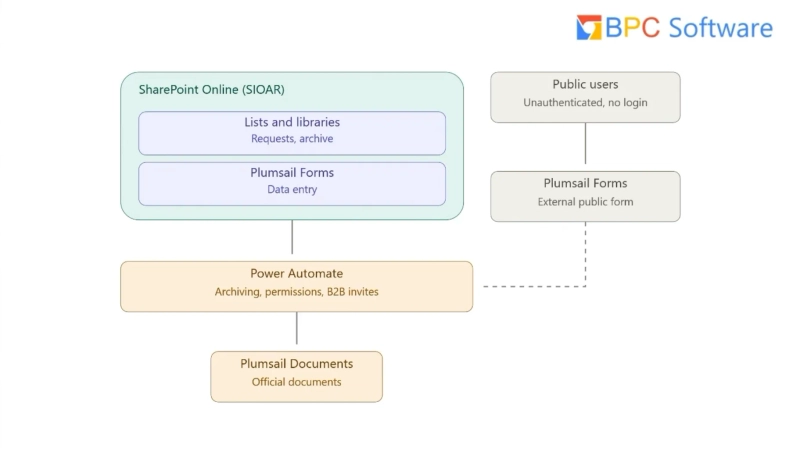
For security reasons, I can't share the whole architecture. Here are the parts relevant to Plumsail:
Data enters through Plumsail public forms, stays in SharePoint Online, and only public projects are exposed back through search.
SharePoint Online stores all the data in lists. There are no attachments: documents live in separate document libraries, because users work with documents a lot, and handling them as list attachments is not great.
Plumsail Forms for SharePoint handle data entry for internal users and members. Some forms exist because the logic is complex, others just for consistency, since they look much nicer than the default SharePoint forms.
Plumsail public web forms let unauthenticated users register and search public data.
Power Automate handles approvals, permissions, archiving and B2B invites.
Plumsail Documents generates official documents at the end of the approval process.
The data in the SharePoint forms never leaves our tenant. Public forms only bring data into the system, and the flows decide what gets exposed outside of it. For a government system that also stores restricted buildings, that was essential.
Public web forms for registration and project search
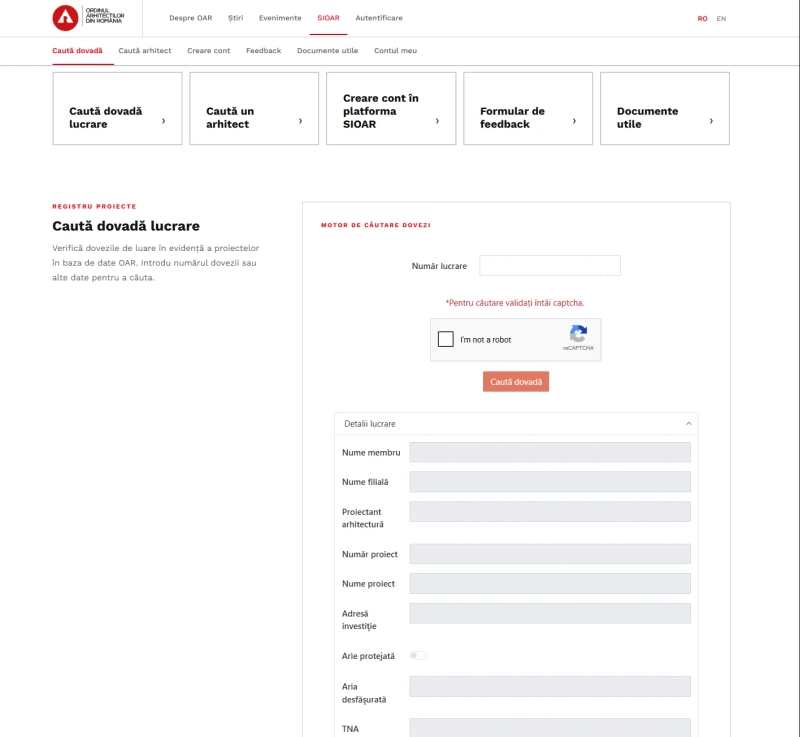
The public part of SIOAR runs on Plumsail public web forms, embedded in the Order's website. Anyone can verify a project, find an architect, create an account, or send feedback:
Public project search on sioar.ro: a Plumsail public web form with reCAPTCHA, returning read-only project details.
The project search form calls a Power Automate flow inside the system, which queries the lists and returns a read-only response. Only public buildings can be found this way, and you need to know the project number. This lets us expose exactly the data we want, outside of the organization, in a safe way. Injection attempts are cut at several levels: in the form itself, and in SharePoint.
Registration with server-side CAPTCHA validation
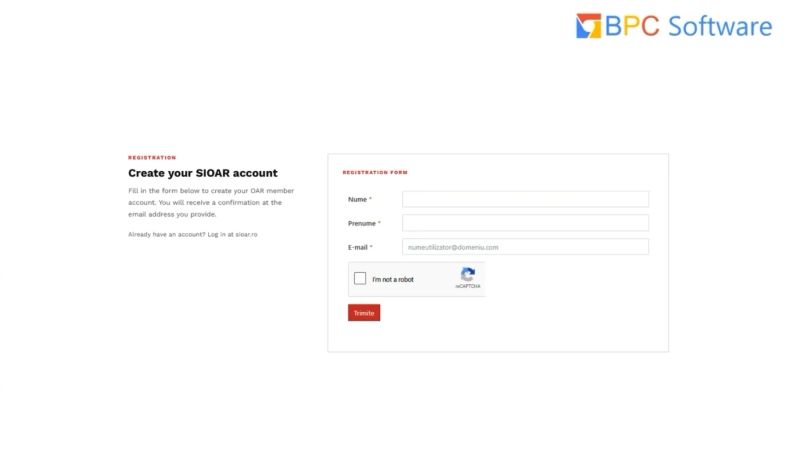
Account creation is the entry point to the system, so we keep it as simple as possible: name, email, and CAPTCHA.
Account registration: just name, email and CAPTCHA.
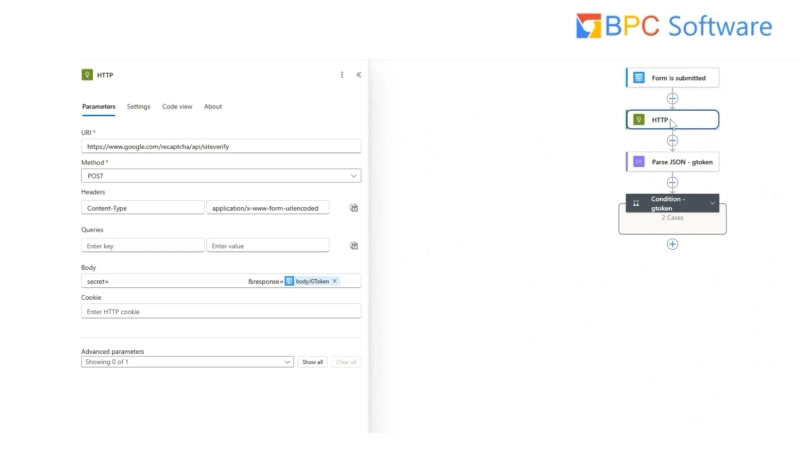
Public forms are already protected by Plumsail: they have to be registered with Plumsail, so the submission endpoint isn't an open API. But with external forms, it's never safe enough, so I added a server-side check. When the form is submitted, the flow sends a POST request to Google's reCAPTCHA verification API with the secret and the token from the form:
The HTTP action verifies the reCAPTCHA token with Google before the flow creates the account.
Each token can be verified only once. If someone captures the data and tries to replay the call, the response is false. The flow parses the response, and only creates the account if the token is valid. The API call is fast, so it doesn't affect performance at all.
If anything fails, the flow returns a generic response without any details. I can debug it in Power Automate, but anyone trying to break in can only see that something went wrong, not what.
Good security, to me, is security that you don't see.
Catalin Soca, SharePoint Developer & Architect at BPC Software
Once the account is created, the flow gives the user a minimal set of permissions. The only thing a new user can do is apply for membership, uploading the required documents, such as their university degree. If the application is approved, the user gets access to more lists and pays the initial membership fee straight from SharePoint, through an external payment integration. After that, they become a full member.
SharePoint form for architect profiles
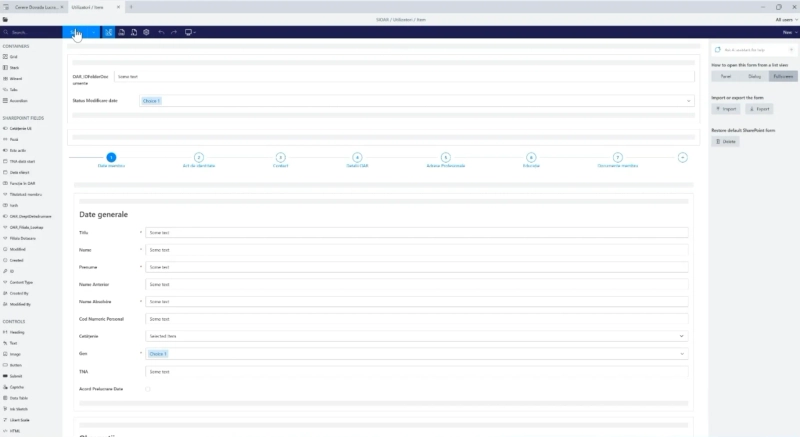
The Users list is one of the biggest in the system: everything from the architect's name to their studies.
Why not keep it all in Active Directory? Users do sign in with their Active Directory accounts, but AD is limited in how many properties you can have, and of what types. So I created a separate Users list, linked to the account by email address. The form's code-behind makes that link, SharePoint handles security trimming, and the UI adapts to the type of user.
Architect profile form in the designer: the hidden technical section on top, and the form split into seven steps.
Two form sets that look the same
This form has two form sets: one for all users, and one for admins. They look exactly the same, but they behave differently. Admins can edit fields that regular users can't, like their name or personal number.
Fields are made read-only from the code-behind, not from the designer, because read-only fields in the UI look different, and fixing that would mean adding CSS. We didn't add any CSS at all: the default look was good enough. On top of that, other rules enable or disable fields dynamically, depending on what the client requested.
When an architect changes their data, the status switches to a pending change, and an approval flow starts. Until the change is validated, they can't use the system as usual, because all documents will use the new data.
Hundreds of rules behind the fields
One field shows how much logic can hide behind a simple input: the personal numeric code (CNP). It's a 13-digit number, where the first digit encodes gender and century of birth, followed by the date of birth, the county code, and a control digit that validates the rest. The form validates the whole number with JavaScript, and fills in the gender automatically. It looks like one field, but there's a lot of code behind it.
Smaller rules make the form easier to use, like a button that copies the home address into the mailing address.
A dashboard inside the form
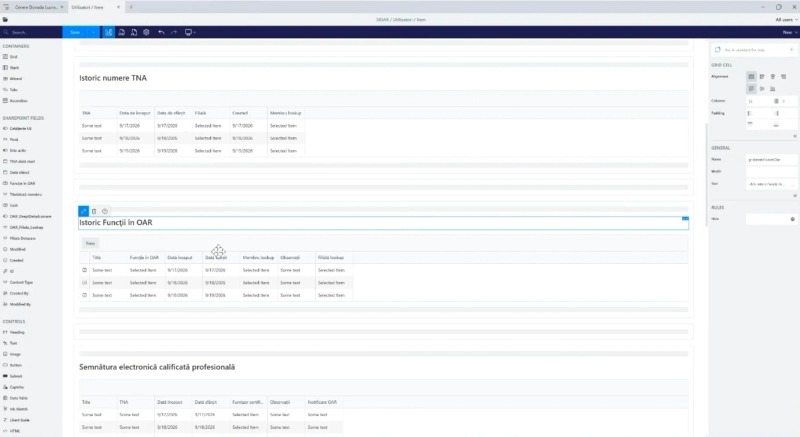
Below the personal data is the architect's full history in the organization, pulled from other lists with List or Library controls:
TNA number history. Every architect gets a unique number in the national register (TNA), which local councils use to identify them. If the number is suspended or changed, the history is kept here.
Positions in the Order, for example, if they become a branch president or director.
Qualified electronic signatures. We integrate with certSIGN: a valid member gets a signature automatically, and if they're suspended or leave the Order, the signature is invalidated automatically.
Branch transfers, architect type changes, ID card history and sanctions.
Professional contracts, studies and accreditations.
History grids built with List or Library controls, with data sources set from the code-behind.
Setting up a List or Library control is simple: you set the site URL and the list. But we had specific filtering rules, so the data source is set from the code-behind. This is effectively a dashboard built inside the form, something that's very difficult to achieve with Power Apps.
Per-user document folders
Since the data and documents are split, users need somewhere to upload documents before the list item even exists. So:
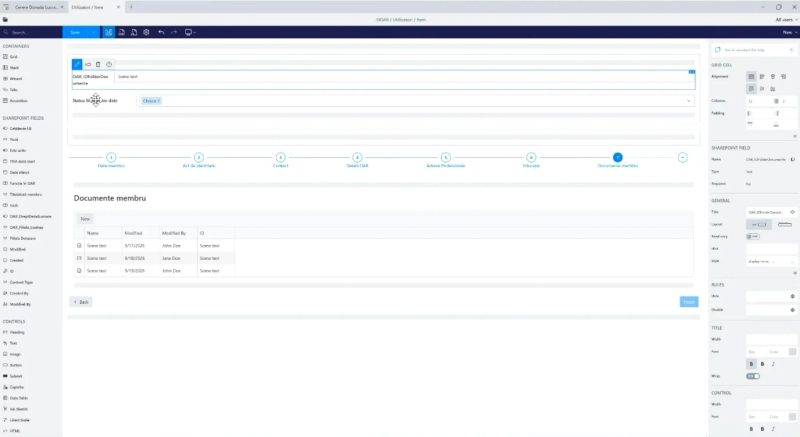
When the form is opened, it creates a folder in the document library, and saves its ID in a hidden field.
A flow on the library breaks permission inheritance on the folder and sets its permissions: only the architect and their branch can see the documents, and the branch can't edit some of them.
In the edit form, the code-behind reads the hidden field and sets the folder as the root of the control.
Because users sometimes close the form without saving, a cleanup flow regularly removes the leftover folders.
Member documents shown from the architect's own folder, linked through the hidden folder ID field.
Plumsail documents a similar folder approach, but we needed more flexibility for these permission rules. To avoid confusion, the libraries themselves are hidden: in one site alone, there are 32 hidden lists and libraries.
Proof of work request form
This is the request that gets a project recognized by the Order. Part of its data later becomes public through the project search, so it covers the whole flow: from outside, to inside, and back outside again.
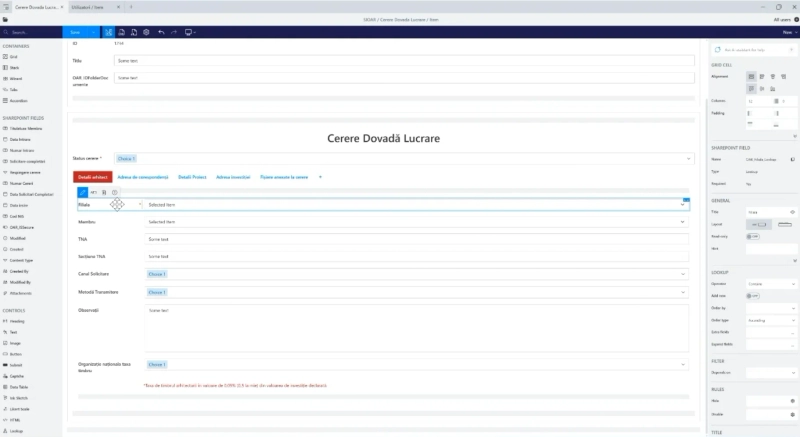
Proof of work request: architect details are filled in automatically, and the branch and member come from filtered lookups.
Checks before the user types anything
When the form opens, the code-behind identifies the user. If they're a member, it fetches their record from the Users list by email and checks it: is the member deceased, still part of the Order, has the contribution been paid, are there any restrictions? If any check fails, the form blocks the request with a generic message. This stops anyone from using someone else's credentials to submit a project.
Architect details are then filled in automatically and are read-only.
Branches submit on behalf of members
Branch users can submit requests for any member of their branch. The branch is filled in automatically, and the member is selected from a standard Plumsail lookup field, filtered to the branch, with extra and expanded fields like the TNA number and status. Selecting a member fills in the rest of their details.
Romanian building law in JavaScript
The project details section is where it gets really complex. We implemented Romanian building regulations directly in the form. Most fields depend on each other: the land area, the built area, the land occupancy percentage (POT), the land use coefficient (CUT), the building's height, the project cost. For example, the building's footprint can't exceed a certain share of the plot, and larger buildings fall under additional percentage rules. All these calculations run in the code-behind.
A building can also be marked as restricted, for example, if it belongs to a ministry or security services. Restricted buildings are excluded from any public search.
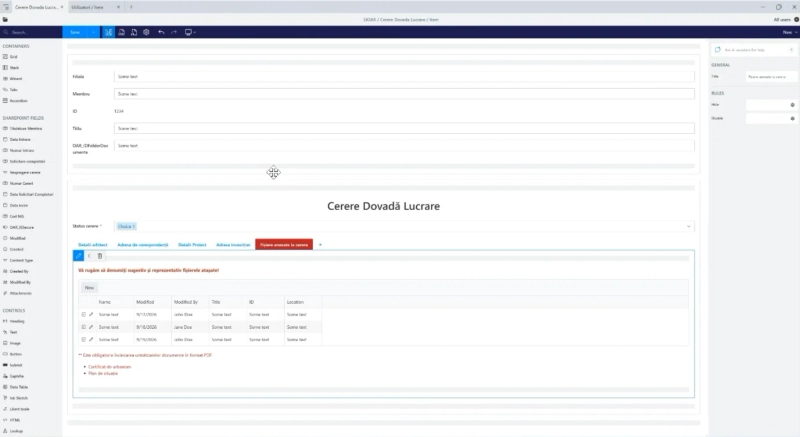
Finally, the attached files grid uses the same folder approach as the profile form, filtered automatically to the request's folder.
Attached files filtered to the request's folder, with the required PDF documents listed below.
Fields that follow the approval stage
The request goes through a Power Automate flow with 8 stages, and each stage defines which fields the user can change. The code-behind sets whether each field is enabled and required, based on the stage and the type of user. Drafts are supported too, since the form is long, and users need to be able to come back to it.
The UI rules live in the form, but the security is enforced by Power Automate. Even if someone manipulates the UI, the permissions set by the flow still apply.
Multi-stage approval workflow with Power Automate
The flow starts whenever a request is created or modified. It reads the member and their branch, and then, at every stage, it breaks inheritance and applies the permissions again from scratch, both for the request and its documents folder. Without the folder permissions, anyone could open someone else's documents.
The stages include:
Draft: the architect and their branch can edit the request.
Submitted: the request is locked for the architect, and escalated to the branch.
Requires clarification: the branch sends it back, and the architect can edit it again.
Payment: the flow creates a payment obligation for the service. A separate payment flow marks it as paid, which automatically moves the request forward.
Validated and finished: the project is approved, and Plumsail Documents generates the official document.
Rejected or cancelled.
Every request also needs a unique number, built by specific rules, so a separate child flow handles numbering and nothing else. At the end of each stage, the flow emails the users to tell them where their request is.
Official documents with Plumsail Documents
At the end of the process, the flow sends the request data as JSON to Plumsail Documents, which fills in a DOCX template and uploads the resulting PDF into the request's folder. A few features made a real difference:
Conditional sections. If there's no data for a section, the template removes it entirely. That's tricky to do with other template engines, and it works really well here.
Unique file names, built from the request number and the date.
PDF protection, so that regular users can't edit the documents.
Run history, which helps us debug if something goes wrong.
These documents are later released to local councils as part of the planning permission, and Plumsail Documents lets us choose the processing region, so the data stays within EU jurisdiction.
Working with Plumsail
I found Plumsail online, and of course, I had questions and some issues along the way. One of them was the document folder setup described above: at the time, we couldn't find a solution. So we contacted Plumsail support.
With big companies, you often get a quick initial response, and then the actual solution two weeks later, or just an AI agent. With Plumsail, the response was very quick, and the team chased us until they were sure everything was resolved. That human touch was very important for us.
I would like to say a big thank you for all of your support. We could not have done it without you. It's not a joke, it's really serious. It helped us tremendously.
Catalin Soca, SharePoint Developer & Architect at BPC Software
Build your own SharePoint solution with Plumsail Forms
With Plumsail Forms for SharePoint, you can build complex business systems on top of SharePoint lists. Add JavaScript where you need it, public forms for external users, and Power Automate to connect it all.
If you'd like to try the product for yourself, get started with 30 days free trial of Plumsail Forms for SharePoint Online by following the installation instruction in our documentation, which includes a full video walkthrough.
And if you need help building a solution, get in touch with Catalin Soca on LinkedIn or reach out to BPC Software.
Related posts
Customer storyFormsMicrosoft 365SharePointPower AutomateMicrosoft Teams
May 16, 2024
Finding the best InfoPath replacement, SharePoint journey of an Australian government agency
Learn how SATC, a South Australian government agency, moved to the cloud and switched from InfoPath to SharePoint forms in their journey to find the best InfoPath replacement option.
Luke Gackle
ICT Service Desk Officer at South Australian Tourism Commission
Customer storyFormsDynamics 365
May 11, 2023
On-site construction forms with Dynamics 365 integration using Plumsail Forms
How LDD Construction Ltd operatives use Plumsail forms on-site to record daily works, with direct integration and data loading from Dynamics 365.
Viorel Boeru
Operations Assistant at LDD Construction Ltd
Customer storyFormsSharePoint
Dec 05, 2023
Using Plumsail SharePoint forms for Efficient Property Management
Find out how Plumsail Forms eliminate the need for multiple mailboxes, facilitate logging and tracking of work, and provide transparency and accountability.





 FormsMicrosoft 365SharePoint
 Power AutomateMicrosoft Teams