Learn how Nel Hydrogen replaced email- and phone-based IT requests with Plumsail HelpDesk for SharePoint, making it easier to assign tickets and transfer them between support teams. With minimal customization, the company has handled more than 45,000 tickets over six years.
We are a Norwegian publicly traded company with a factory in Norway and in the USA. We produce equipment that can produce hydrogen. Some are big and require a separate building, while some are small and used in a submarine.
Our work covers equipment of very different sizes and applications. Supporting that business also means handling everyday IT requests and coordinating assistance across first, second, and third levels of support.
As Head of IT Operations, I manage the two IT support teams that use Plumsail HelpDesk. I was the initial driver for selecting and implementing the system.
The challenge: sharing IT requests across support levels
Before we started using Plumsail HelpDesk in early 2020, just about when Covid-19 began, IT requests for assistance were emails or telephone calls, which were difficult to share among different support levels.
With requests coming through emails and telephone calls, the difficulty was sharing them between the people involved. An issue might need attention from different support levels, so receiving the request was only part of the work. We also needed to move it between colleagues and keep an overview of the situation.
We tested a few ticket systems and even Microsoft Planner, but eventually started using Plumsail HelpDesk. It gave us a way to manage requests as tickets and pass issues between support resources more easily.
The solution: SharePoint ticketing with assignment rules
Our setup is "out of the box", and besides adding a few rules to assign tickets to a specific Agent and select a relevant Category for a ticket, the system is basically untouched.
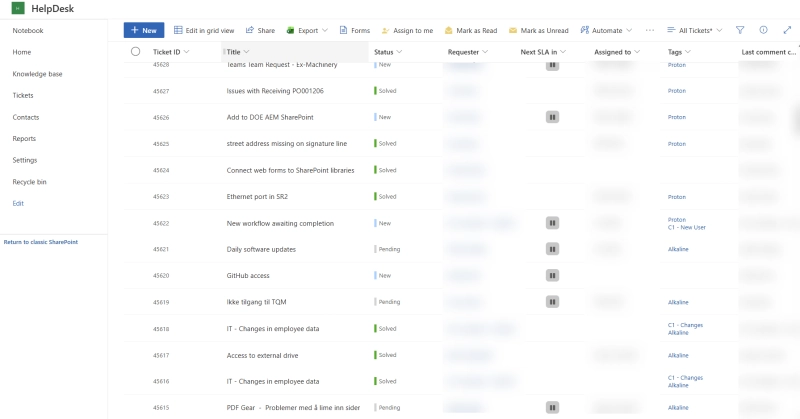
Nel Hydrogen's IT support tickets list in SharePoint
These rules help organize incoming work by assigning tickets to the relevant person and selecting a category. Beyond those adjustments, we use the standard system for our everyday support work.
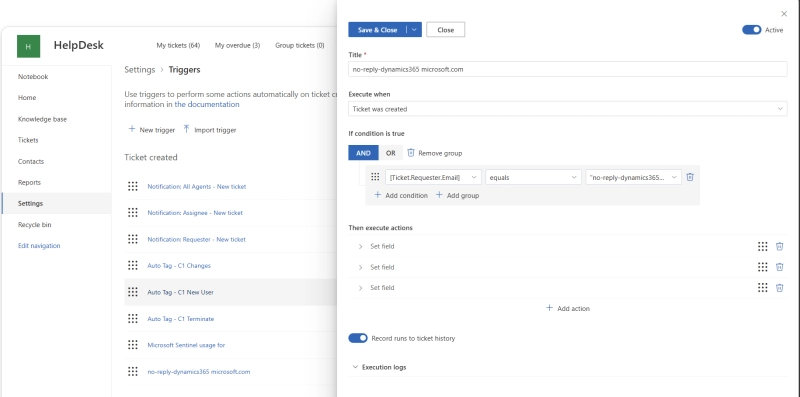
HelpDesk trigger that checks the requester's email and updates ticket fields
💡 Learn how to automate ticket assignment and field updates with HelpDesk triggers.
That standard setup has been enough for the way we work. After more than six years, we still use HelpDesk with only a few changes, keeping the process straightforward for the people handling requests.
Our ticket system is so simple that I would call the learning curve a straight line and not a curve.
Peter Klaris, Head of IT Operations at Nel Hydrogen
The result: easier handoffs and a better overview
Basically, it made us move "issues" between resources and made it simpler to have an overview of a "situation".
This is the practical difference from our earlier approach. When another support resource needs to take over an issue, we can move the ticket along and follow the situation more easily. That addresses the sharing difficulties we had when requests were handled through emails and telephone calls.
Since implementing the system in 2020, we've handled 45,356 tickets with minimal customization. Our IT support feedback has also been positive, with 98% of survey responses rating the service positively.






 HelpDeskMicrosoft 365SharePoint
 Power Automate