A good lead capture form can be the hook that makes your website visitors become qualified leads. But how do you make
your lead form good?
In this guide we'll look at how to build a high-converting lead capture form, embed it on your
website, and learn what makes lead forms effective.
What makes a lead capture form high-converting
Before choosing a tool and building your lead capture form, it's worth knowing how you can make it effective:
- Keep the length balanced. Short forms convert better, but it's more complicated than that.
Too short and you lose the data you need to qualify leads. Ask what matters.
- Use the foot-in-the-door technique. For longer forms, go multi-step: start with easy, anonymous questions first,
and leave personal fields like name and email near the end.
- Make the CTA clear and direct. Say what the user gets — "Subscribe", "Claim your free trial" — and make the
button stand out from the page.
- Use responsive design. Your form should work on any device. You never know where a lead will find you.
- Validate data. Check email, phone numbers, and other fields in the form itself, before they get to your CRM.
Keep things clean.
- Give something in return. Reward users with a promo code, gated content, or a trial.
Choosing the right tool for lead capture forms
With those principles in mind, the next step is choosing a tool that can deliver them without slowing you down —
one that does all that under the hood, leaving you free to focus on the content.
Plumsail Forms is built exactly for this: a designer where you drag and drop ready-made fields and tweak
settings to create a responsive, attractive online form. Out of the box, it gives you:
- Ready-made fields with built-in validation — emails, phone numbers, and other contact details come in clean.
- Multi-step wizard navigation — ideal for the foot-in-the-door approach on longer forms.
- Thank-you messages and redirects — reward a lead with a promo code, or send a hot lead straight to your shopping page.
- Integrations with Airtable, SharePoint, and automation services like
Zapier, Make, and Power Automate — connect your favorite CRM to automatically add new leads.
You also don't have to start from scratch!
With Plumsail Forms, you can choose one of the pre-made form templates as your
base, and then customize it to match your brand and requirements.
That's exactly what we'll do next.
Create lead generation form from template
Here is a "Contact Us" form that we will modify and turn into a lead capture form:
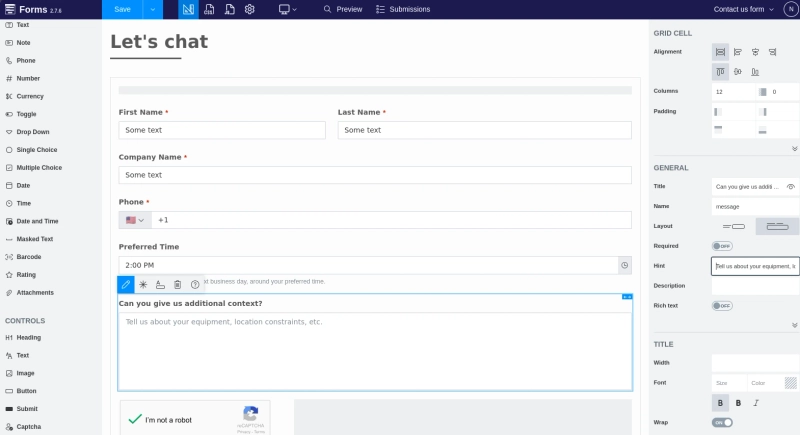
This template already looks pretty good, but let's say we are a wholesale company. I can easily turn this into a B2B lead
capture form by changing existing fields and asking some details about client's organization. I will also add a Captcha control
to prevent any bad actors poisoning my lead data.
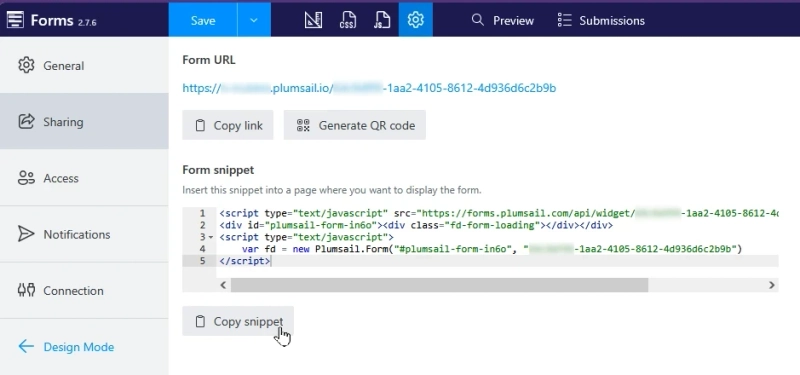
Now we just need to embed this lead capture form on our website. I'll simply go to Sharing settings, and copy
the snippet for embedding:
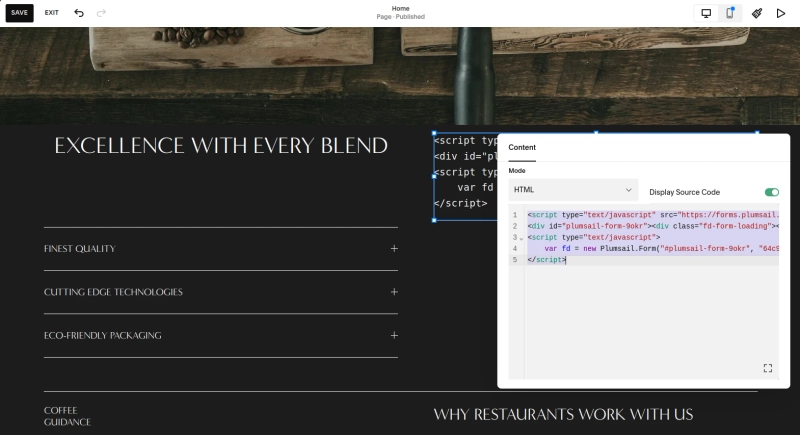
All that's left is to add the snippet to our website.
- If your website is code-first, simply paste the snippet in the appropriate place.
- If you are using a website builder like Squarespace, there should be an element where you can paste your HTML snippet.
Create your lead capture form with Plumsail
As you can see, creating a lead generation form is simple, but making it attractive for your leads is much trickier.
Thankfully, with tools like Plumsail Forms you can easily experiment and prototype new ways to attract new leads and
convert them into customers.
Try Plumsail Forms right now! With the free tier, you can check all of its capabilities and connect it
to your lead management platform of choice — HubSpot, Salesforce, Monday, or any other CRM.


 FormsMake