Data-Centric, Information Services and Technology Leader
Steve Ayres, Systems and Data Consultant at The University of Manchester Innovation Factory, shares his experience using Plumsail public forms and SharePoint Forms to improve the organisation's internal processes.
The University of Manchester Innovation Factory tested several tools, but none could meet all requirements. One of the key challenges was finding a single solution that supported both customized SharePoint list forms and external public forms with the needed integration and security. This case study shows how the team addressed this problem using Plumsail Forms to unify their internal and external forms.
In addition to the article, watch the interview with Steve Ayres from The University of Manchester Innovation Factory on our YouTube channel:
About The University of Manchester Innovation Factory
The University of Manchester Innovation Factory, a wholly owned subsidiary of The University of Manchester in the UK, is dedicated to translating groundbreaking research from the lab into the real world.
The Innovation Factory commercializes intellectual property through licensing, creating spinout companies, forming strategic partnerships, and helping academics and students turn discoveries into valuable products. Currently, its portfolio includes over 100 active companies, with £158 million invested in the last three years and a combined economic value of more than £600 million since 2004.
Challenge of finding the universal forms solution
Before using Plumsail Forms, different tools were tested, but none could meet all requirements. The biggest challenge was the absence of a single tool that could cover all the requirements from different teams, including security requirements, SharePoint integration, and external sharing. Each team used their own solution, which caused a great deal of confusion and inconsistency in user experience, management, and system standardization.
External forms: We tested Microsoft Forms; they were good for lightweight needs, but we hit capability limits quickly. We tested some other third-party tools; they were good on the surface, but turned out to be either not very customizable or difficult to integrate with SharePoint.
Colleagues knew they wanted more from a form/automation solution and that efficiency gains were possible, but were quickly hitting limitations with the platforms like MS Forms.
Steve Ayres, Data-Centric, Information Services and Technology Leader
SharePoint forms: At some point, we turned to Power Apps, which has a lot of capabilities, but also requires a high level of expertise to really make the most of it. And we are not at the point where we can bring people just to design forms.
Solution: Plumsail Forms for internal and external users in SharePoint
Platforms that offer both public and internal form solutions for SharePoint within a single product are rare.
We chose Plumsail Forms for its simplicity yet powerful capabilities. The key factor was the combination of internal and public forms, as well as the ability to go way beyond basic forms and create secure, custom apps within SharePoint.
Deep integration: We use Plumsail Forms for SharePoint when we need a high level of integration with SharePoint: lookups across lists, access to the Graph API, multi-level approval flows, etc. We integrate Plumsail forms as a trigger for a broader process, which is often run via MS Azure Logic App or MS Azure Function.
External sharing: We use Plumsail public forms to collect data from external users, such as academics, consultants, and partners. The forms are integrated with SharePoint lists and libraries.
High level of customization: We extensively use JavaScript and CSS to customize forms and extend its functionality.
Security and compliance: Plumsail Forms passed security and compliance reviews by the Information Services, data governance, and university IT teams.
Plumsail Forms is the perfect combination of customization without being too big, too scary, or too difficult to manage.
Steve Ayres, Data-Centric, Information Services and Technology Leader
Purchase Order system with Plumsail Forms in SharePoint
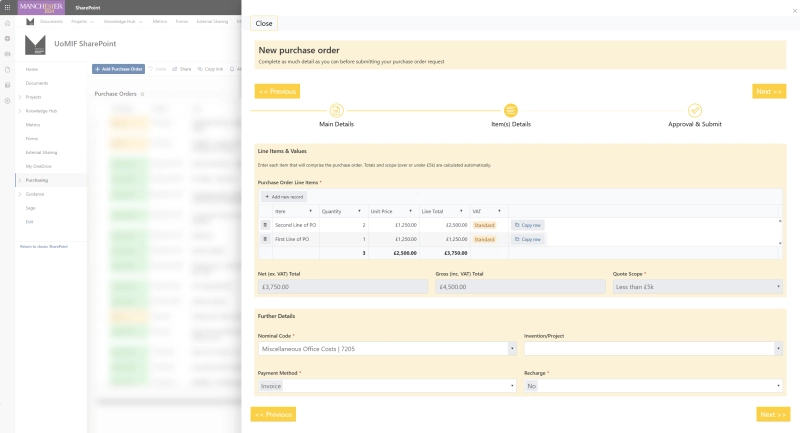
One of the systems we've built with Plumsail Forms was a Purchase Order system.
The nature of our business requires us to work a lot with external consultants and do a lot of patent work, not to mention general office purchases. All of that is tracked and managed through a Purchase Order system. Our 15-year-old SharePoint PO system was creaking under the load.
It would have taken months with Power Apps to build something similar. With Plumsail Forms it took us about four weeks to go from the idea to a working solution
Purchase Order form
The form is integrated with Power Automate, and the whole order process is multi-stage, with approvals built in, and is quite complicated and complex.
Purchase Order workflow in Power Automate
Example of JavaScript usage in Plumsail public forms
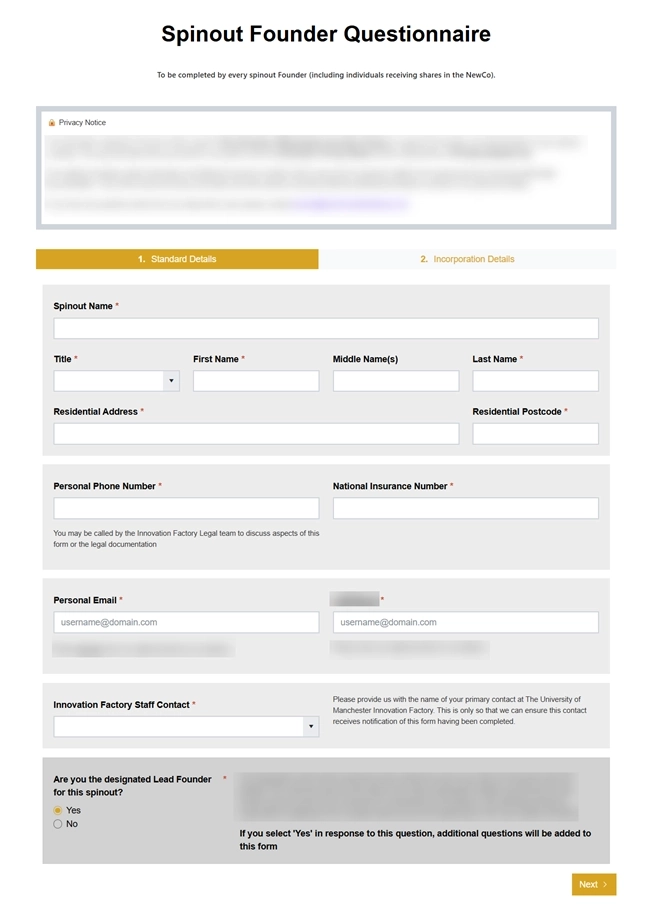
For external sharing forms, to collect data from academics or consultants, we use public forms that are integrated with SharePoint.
Founders Questionnaire form
On the form, we ask the user to answer three security questions; each question is selected from a drop-down, and the user adds the answer into a text field. For each, they can choose from a selection of about 10 predefined questions in the drop-down. We use JavaScript to remove the already chosen questions from the second and third drop-down boxes.
Founders Questionnaire form — Security Questions
Benefits of choosing Plumsail Forms
We use Plumsail Forms increasingly now, there are several reasons for that:
Unified Platform: We have one tool for external and SharePoint forms, which eases maintenance and support.
Consistent UX: All forms have a unified style and logic; it all looks like one whole system now.
Rapid Development: Plumsail Forms is a contained solution that allows us to go from idea to production-ready solution under tight deadlines.
Extended Functionality: We use JavaScript, integration with the Graph API, and Power Automate to build complex workflows. Essentially, we can do whatever we want on the back end.
Plumsail Forms addresses all the challenges we had before, and we now have one tool we can stick with for the long term.
Get started with Plumsail Forms for SharePoint and public forms
How Studio Source Yearbooks replaced PDF order forms with Airtable and Plumsail
See how a yearbook software company automated their ordering process using Plumsail Forms with complex calculations, conditional logic, and Airtable integration.
Michael Sheasby
CTIO at Studio Source Yearbooks
Forms
Customer Story
Apr 01, 2025
Leave requests management with SharePoint Forms at EFAFLEX
See how EFAFLEX automated their leave request process using Plumsail Forms for SharePoint Online, creating an efficient approval workflow.
Malte Schöppe
IT System and Network Administrator at EFAFLEX
Forms
Documents
Customer Story
Apr 04, 2024
Evaluation forms and automated assessment reports for occupational therapy
Functional capacity assessment and other crucial therapy procedures automated by Laneway OT, occupational therapists from South Australia, to eliminate human error, reduce time and paper waste.
Erina Tan
Director, and Occupational Therapist at Laneway OT