Founder and Chief Executive of PRODUITS DE L’EQUIPE LLC
This business case was shared by Oil-Royalties and Ronald Achs, who used Plumsail Documents with Jotform, Make, Google Sheets, and Dropbox Sign to automate agreement generation and deliver pre-filled e-sign agreements for their Virtual Auction™ Marketplace for oil and gas royalties.
Oil-Royalties is ChatGPT #1 rated fully automated Virtual Auction™ Marketplace for oil and gas royalties. The platform is designed to simplify a traditionally complex transaction process and help buyers move from initial exploration to closing in one connected experience.
Challenge: pre-filling e-sign agreements from Jotform submissions
We had trouble pre-filling our e-sign agreements while maintaining a smooth user experience. We use Jotform as our form builder, but they were not able to help us with URL-type pre-fill methods, even though we tried that angle exhaustively.
For our marketplace, this was an important part of the customer journey. We wanted the agreement process to feel smooth and connected, without asking users to re-enter information they had already provided. At the same time, the e-sign documents had to work reliably within our broader automation flow.
After exploring the available options, we then shifted to Dropbox Sign and Plumsail. Only Plumsail was able to make that work.
Ronald Achs, Founder and Chief Executive of PRODUITS DE L’EQUIPE LLC
Solution: automating agreement generation with Plumsail, Make, and Dropbox Sign
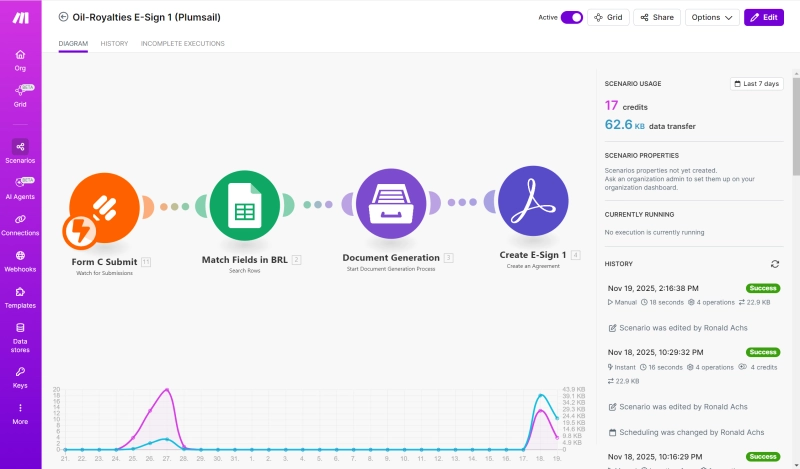
Our Virtual Auction™ Marketplace has dozens of Make automations including three distinct e-sign documents — all of which flow from Jotform “in form submit” Triggers, through Google Sheets “search rows”, then to Plumsail for “document generation” and to Dropbox Sign for delivery. There are other Modules in the same automation (for user notifications and such), but you get the gist of it.
Make automation that sends Jotform submission data through Google Sheets and Plumsail Documents to Dropbox Sign
This setup allowed us to automate the agreement flow while keeping the documents themselves exactly as we needed them.
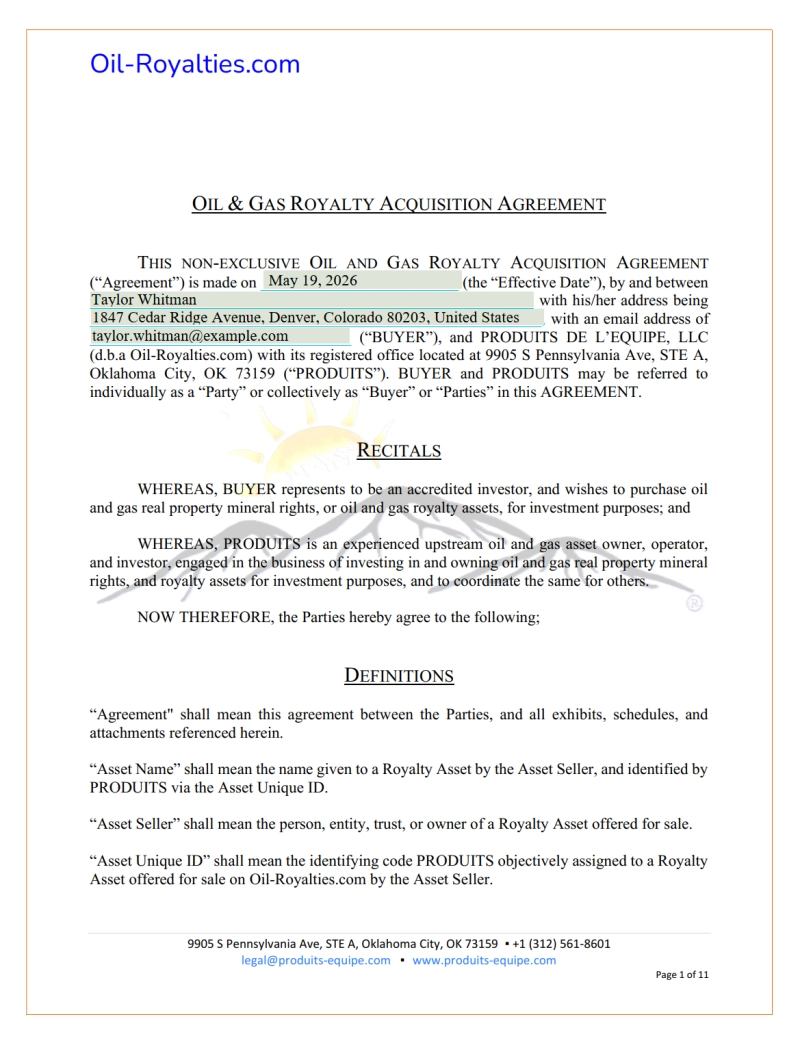
Plumsail allowed our PDF agreements to remain as we had our legal counsel prepare the rhetoric and how we prepared the visual aspect of the document itself. That was vital to our user experience mandates.
Example of the generated e-sign agreement used in the Oil-Royalties automation flow
This gave us a working e-sign agreement flow that fits our automation setup and preserves the document experience we wanted for our users.
If you have any questions, feel free to book a free call with our team.
Related posts
Customer storyDocumentsMicrosoft 365
Mar 31
Printable document automation in Microsoft 365 at LT Corporation
See how LT Corporation replaced legacy reporting approaches with Microsoft 365 automation for printable reports, shipping documents, and operational checklists.
Jeff Phillips
Senior Director of IT at LT Corporation
Customer storyDocumentsDynamics 365
Dec 26, 2025
Multilingual field reporting from raw Dynamics data at AEG Power Solutions
Learn how AEG Power Solutions automates their workflow with Plumsail Documents and Dynamics 365.
Jérôme Huet
Digital Project Leader at AEG Power Solutions
Customer storyDocuments
Jun 19, 2025
Automating medical center operations with Power Platform and Plumsail Documents by WinOn365
See how WinOn365 automated a Swiss clinic's workflows using Microsoft Power Platform and Plumsail Documents, eliminating manual Excel processes.




 DocumentsMicrosoft 365