This business case was shared by Northern GeoSeptic, a Minnesota-based septic design and site development company, and its owner, Todd Heiman, who built an automated workflow with Airtable, Make, Plumsail Documents, and Plumsail Forms to manage proposals, site reports, and other administrative processes.
Northern GeoSeptic: A family business split between the field and the office
At Northern GeoSeptic, we view ourselves as more than just a service provider; we are strategic partners dedicated to protecting your land investment.
We combine engineering expertise with advanced mapping technology to offer a personalized approach to site development and septic services, moving far beyond one-size-fits-all solutions.
Our goal is simple: to help you understand the long-term value of your project upfront, so you can move forward with total confidence and zero costly surprises.
Running this family operation alongside my son in Minnesota means our rhythm is dictated by the seasons, requiring 50% technical expertise and 50% battling an absolute mountain of paperwork.
The on-season (mid-April to November): My son, a professional engineer, is out in the field—likely getting eaten by mosquitoes—performing septic inspections and designs. He handles the high-level expertise and complex state regulations, while I stay in the office managing the admin and keeping the gears turning.
The off-season (Winter): When the ground freezes, I switch hats. Using my degree in Computer Science, I become our dedicated programmer. I take this role seriously—I even flew to the Make conference in Munich this year to stay on the cutting edge of automation.
My mission during the winter is to automate every manual task possible, ensuring that when spring hits, we aren't drowning in forms, but are ready to focus entirely on our clients' projects.
The problem: Retyping the same data across proposals, invoices, and reports
Before we found a workaround, our reporting process was what I call a loop of repetitive, soul-crushing tasks. In the septic industry, everything is form-heavy and marked by regulations. You wouldn't believe the amount of paperwork required by the counties and the state. We were sitting down and retyping the exact same client names, addresses, and parcel IDs for the tenth time that day.
Whether it was proposals, invoices, or site requests, the impact was clear:
Wasted time: Our team was losing hours to manual data entry that should have been spent on higher priorities.
Redundancy: We were stuck filling in the same basic information over and over again.
Frustration: It's demoralizing to feel like you're stuck in the 90s when you know better tools exist.
I knew at that point that we needed a technology stack that was flexible enough to handle our data but easy enough for a two-man team to maintain.
The solution: Process automation with Airtable, Make, and Plumsail
I did some pretty extensive research, looking at different databases and automation solutions. Eventually, we settled on Airtable as our central database and Make as the engine to move everything around. But there was still a gap in how we actually collected info and generated the final documents.
That's where Plumsail became the missing piece of the puzzle:
Seamless data collection: We use Plumsail Forms for everything from client onboarding to job applications. This data now feeds directly into Airtable without me lifting a finger.
Tip: See how structured job data can be collected in the Job Intake Form template, with conditional sections for service type, site details, and scheduling information.
Automated document generation: When we need a proposal or invoice, a Make scenario pulls the data from Airtable and passes it to Plumsail Documents.
Scalability: We can now generate a full proposal with just a few clicks. This is a game-changer for us because we aren't just managing one or two forms—we have around 50 different document processes running right now.
It doesn't matter if it's me in the office or my son out on a job site; Plumsail does the heavy lifting for all of it.
Our usual workflow
Most of our automation flows actually follow a reliable, few-step path between Plumsail, Airtable, and Make.
Make scenario for document generation and Airtable updates
Here is how we usually piece it all together:
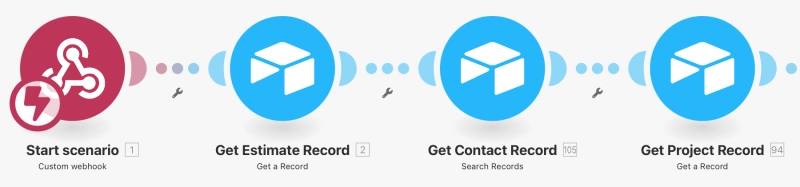
We start by pulling our existing form via a webhook call. The form is directly connected to Airtable and is used to update Airtable records automatically.
Next, we use a unique request ID to track down the right record in Airtable and update it with the new info.
Make webhook and Airtable record lookup for editing an existing record
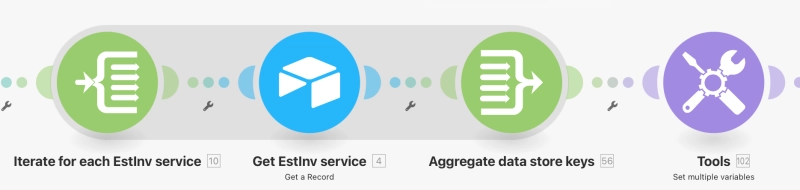
Once the record is up to date, we grab any extra details we need from other tables to make sure the final report isn't missing anything.
All other tasks, like mapping and formatting the data, are completed in Make so everything is polished and ready to go.
Collecting and mapping related Airtable data
From there, we map all that data into our template and trigger the report generation.
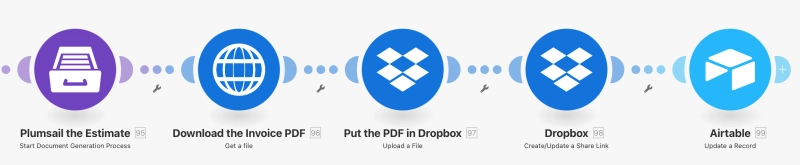
Finally, the resulting document gets uploaded to Dropbox and tucked back into the original Airtable record so it's easy for the team to find.
Generating a document and uploading the result to Dropbox
The commitment: How we know we're on the right track
We are committed to both Plumsail Documents and Plumsail Forms. We have used these tools for quite some time now, and they are without a doubt a permanent part of our technology stack. But we didn't just base this on our experience.
I actually hired two different consulting firms recently to audit our stack and make sure I hadn't missed anything. It was a huge relief when both of them validated our choices. Neither one suggested any changes to our platforms; they told us we were exactly on the right track with Plumsail, Make, and Airtable.
The make-or-break factor: Fast and reliable support that actually responds
I have to mention one more thing that really matters to me: support.
I feel like if you go with a product and there's bad support, I would rather not even touch it, even if it had the greatest functionality in the world... Plumsail has been great as far as that goes.
Over the past couple of years, I've communicated with their team frequently, and that reliable help gives us total confidence in the platform. Here is why it works for us:
Real human interaction: Whether I'm dealing with a bug or just trying to figure out a new feature, someone actually gets back to me.
Speed and reliability: We never feel like we're on our own. If an issue arises, I know I'll receive quick assistance and a practical solution.
Confidence: Knowing there is a team behind the tool allows us to build complex processes without the fear of getting "stuck."
Having that safety net is what makes a technology stack sustainable for a small business like ours.
What we're improving next during the off-season
We are not standing still. As the weather turns and the field work slows down, I'm getting ready for my programming season. We are already looking at migrating our processes to the modern templating engine and seeing how much further we can push our automation.
It's been a journey going from manual typing to full automation, but it's the only way to grow. We focus on the septic work, and we let Plumsail handle the paperwork.
Get started with Plumsail Documents and Forms
Inspired by Northern GeoSeptic's success story? Try Plumsail Documents with a 30-day free trial and start using Plumsail Forms with the free plan, available with no time limit.
If you have any questions, feel free to book a free call with our team.
Related posts
Customer storyDocuments
Jun 19, 2025
Automating medical center operations with Power Platform and Plumsail Documents by WinOn365
See how WinOn365 automated a Swiss clinic's workflows using Microsoft Power Platform and Plumsail Documents, eliminating manual Excel processes.
Natali Glodeanu
Power Platform Expert at WinOn365 GmbH
Customer storyDocumentsDynamics 365
Dec 26, 2025
Multilingual field reporting from raw Dynamics data at AEG Power Solutions
Learn how AEG Power Solutions automates their workflow with Plumsail Documents and Dynamics 365.
Jérôme Huet
Digital Project Leader at AEG Power Solutions
Customer storyFormsSharePoint
Last updated: Sep 20
A single solution for SharePoint and external forms: The University of Manchester Innovation Factory's experience
See how Plumsail Forms provided SharePoint-integrated internal and external forms that improved the Purchase Order system.
Steve Ayres
Data-Centric, Information Services and Technology Leader






 Documents