CWP Global develops renewable energy projects across multiple markets. They share how they used Plumsail Forms for SharePoint, together with SharePoint lists and Power Automate, to replace a fragmented spreadsheet-based process with a centralized, transparent, and scalable risk management tool.
Managing project risks across multiple countries and projects requires more than spreadsheets and email threads. As CWP Global continued to develop and manage a growing portfolio, the team needed a more consistent and transparent way to identify, assess, review, and escalate risks across the business. This case study explains how they built that solution — currently in pilot and planned to scale to approximately 10 countries and 39 projects.
CWP Global stands at the forefront of renewable energy development:
Developed Europe's largest onshore wind farm
Created the largest renewable power portfolio in Australia
Building Southeast Europe's largest grid-connected power portfolio across 10 countries
Pioneering the development of ultra large-scale green hydrogen hubs
With a geographically distributed portfolio and many stakeholders involved in project delivery, effective risk management is essential for maintaining visibility, supporting decision-making, and ensuring timely escalation of material issues.
The challenge: inconsistent, spreadsheet-based risk tracking
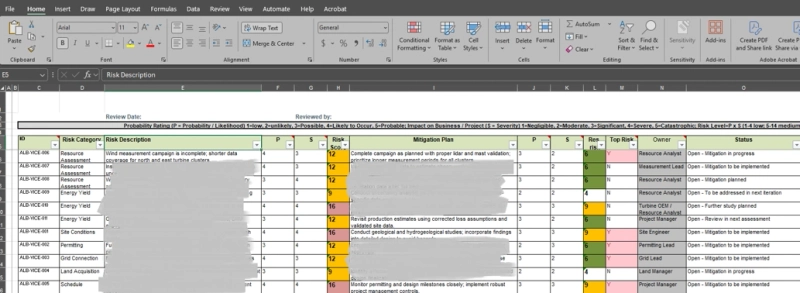
Before this solution, the risk management process was difficult to manage consistently. Risks were tracked in multiple Excel files, often in different formats, with no centralized register. Information was scattered, visibility was limited, and the process was messy and difficult to govern at scale.
This created several recurring problems:
Inconsistent scoring
Unclear ownership
Weak escalation paths
Manual coordination
Fragmented reporting
Limited accessibility for different stakeholder groups
The goal was not only to digitize the process, but to make it simpler for users while giving management and functional teams better transparency into material risks. The underlying business logic was already defined — risks needed to be identified throughout project phases, assessed by impact and likelihood, reviewed collaboratively, and escalated when necessary.
Why CWP Global chose Plumsail Forms for SharePoint
Standard SharePoint forms would not have provided the same level of visual clarity and business logic inside the form itself.
For this use case, it was important that users could not only enter data, but also immediately understand the significance of a risk while filling in or reviewing the form. Plumsail made it possible to present risk information visually, apply business logic in real time, and build a form experience that felt aligned with the process itself — rather than a basic list form.
This extra layer of visual identity and live form logic helped turn what could have been a simple register into a practical business tool.
The solution: centralized workflow for capturing, reviewing, and escalating risks
The solution was built using SharePoint lists, Power Automate workflows, and Plumsail Forms for SharePoint.
At its center is the Risk Register, which stores the main risk records. Around it, supporting lists for Countries, Projects, Risk Categories, and Config allow the form and workflows to apply logic dynamically, rather than hard-coding values directly into the form.
A Risk Register Snapshots list was also added to preserve historical versions of the data for future trend analysis — creating a foundation for portfolio-level reporting as the solution matures beyond the pilot phase.
The tool reflects the ownership model of the process. Project Managers maintain the project risk register, Country Managers review risks for their countries, functional teams contribute to risks in their areas, and the Risk Committee and C-Level Management review key risks requiring escalation or decisions.
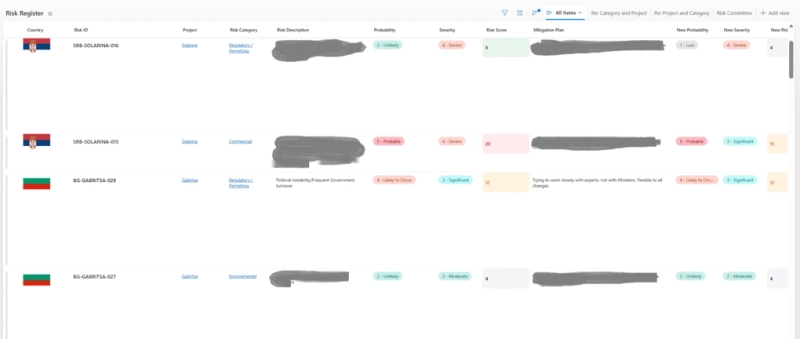
Risk Register overview showing centralized risk records with calculated scores and relevant views.
How the process works in practice
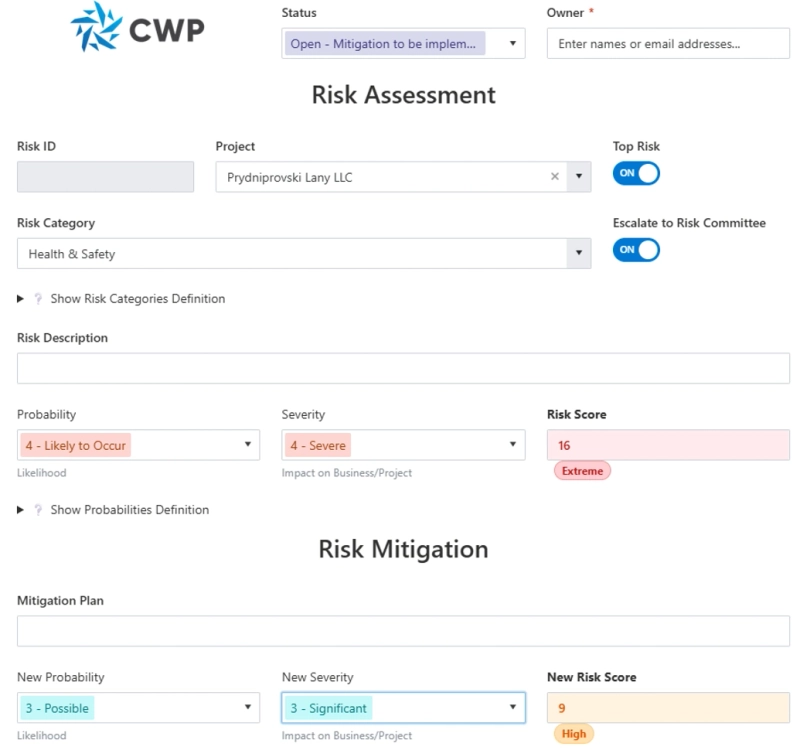
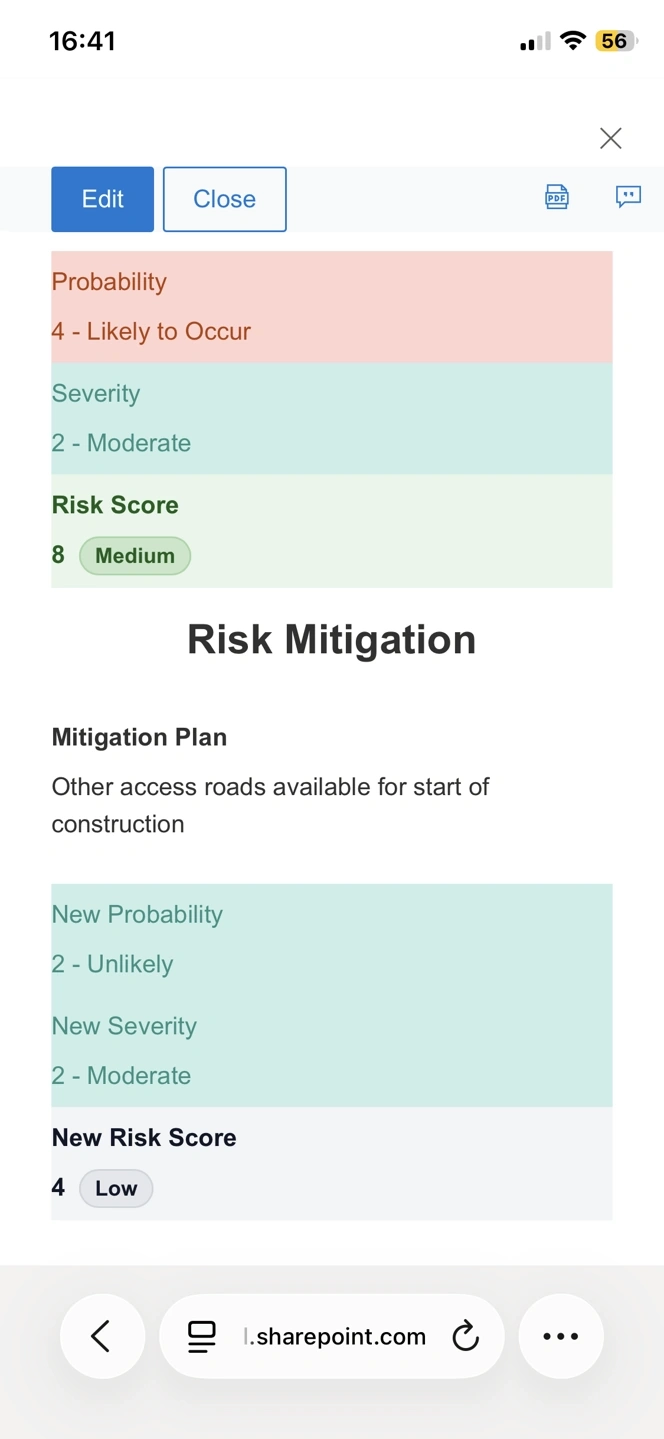
In a typical scenario, a Project Manager identifies a new risk and opens the Risk Register form. They select the relevant country, project, and risk category, describe the risk, and complete the initial assessment by choosing probability and severity. The form automatically calculates the initial risk score and displays the result visually inside the form.
The user then defines the mitigation plan and updates the expected probability and severity after mitigation. The form recalculates the residual score, so reviewers can immediately compare the original risk level with the expected residual risk after mitigation actions.
Once saved, the system applies the correct permissions automatically. If the risk score exceeds the configured threshold, or if the user marks the risk for escalation, Power Automate sends notifications to the Risk Committee.
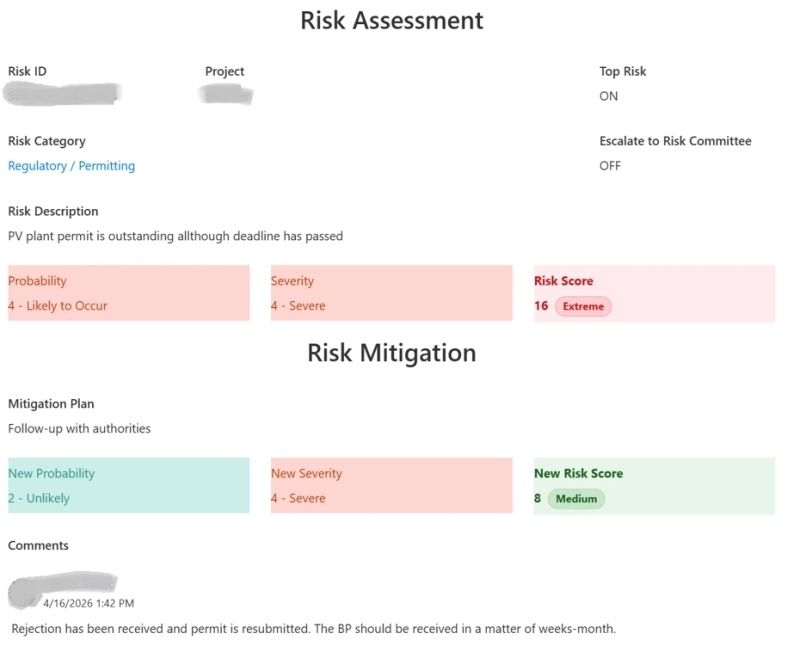
Over time, users update the risk, add comments, adjust mitigation actions, and revise the residual score. Register views help different stakeholders focus on the risks relevant to them, while snapshots preserve historical data for future trend analysis.
Simplified workflow
1
Identify risk A user identifies a project risk and creates a new record in the Risk Register.
2
Assess risk The user selects country, project, risk category, probability, and severity.
3
Calculate score The form calculates the initial risk score automatically.
4
Define mitigation The user adds a mitigation plan and expected residual probability and severity.
5
Recalculate residual risk The form calculates the residual score after mitigation.
6
Apply permissions The system applies role-based permissions automatically.
7
Review Relevant stakeholders review the risk based on role, country, or function.
8
Escalate if needed Material risks trigger notification to the Risk Committee or are marked as Top Risks.
9
Monitor and report Risks are updated over time; snapshots preserve history for future reporting.
Key features and technical implementation
Automatic risk scoring and visual assessment
One of the most useful improvements was automatic calculation of the risk score directly inside the form. Users assess each risk based on probability and severity, and the form calculates the score and displays it in a clear visual format.
This removes the need for manual interpretation and standardizes how risks are assessed across projects. Because of Plumsail Forms, the form could also highlight the status and importance of a risk while the user is entering or reviewing it — simplifying the process without reducing its depth.
Risk Assessment and Risk Mitigation sections showing automatic scoring before and after mitigation.
Role-based permissions built into the process
Each risk has its own set of permissions applied automatically:
Edit access:
Risk Committee members
C-Level Management
The risk creator
The relevant Project Manager
Read access:
Country Managers for the relevant country
Responsible persons for the selected risk category
This approach ensures that users see the information they need while maintaining proper control over editing. Instead of relying on manual access management, the solution supports a direct governance model in the system.
Automated escalation and notifications
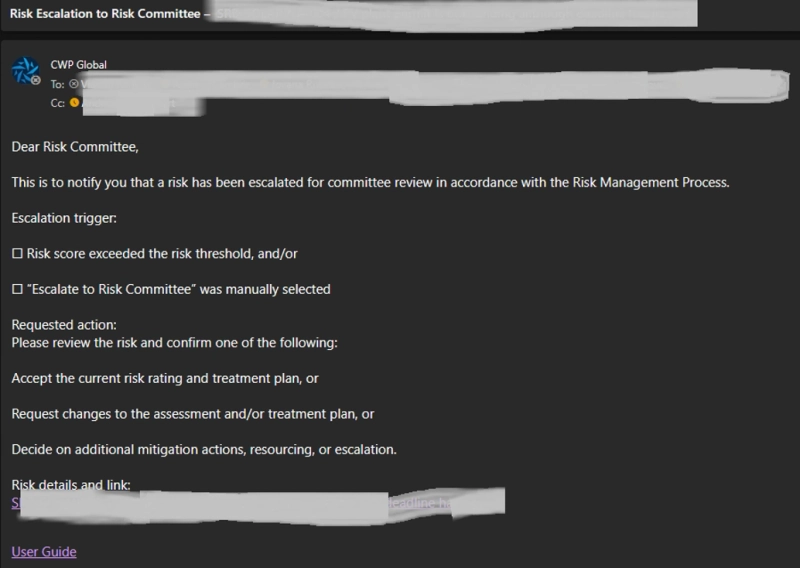
If a risk score exceeds a configured threshold, or if the Escalate to Risk Committee flag is turned on, an automatic email notification is sent to Risk Committee members via Power Automate.
This makes escalation more transparent and reduces dependence on manual reminders or separate email chains. Risks can also be marked as Top Risks so they are included in project review discussions and management-level reporting.
Power Automate escalation notification for high-scoring or flagged risks.
Views, snapshots, and future reporting
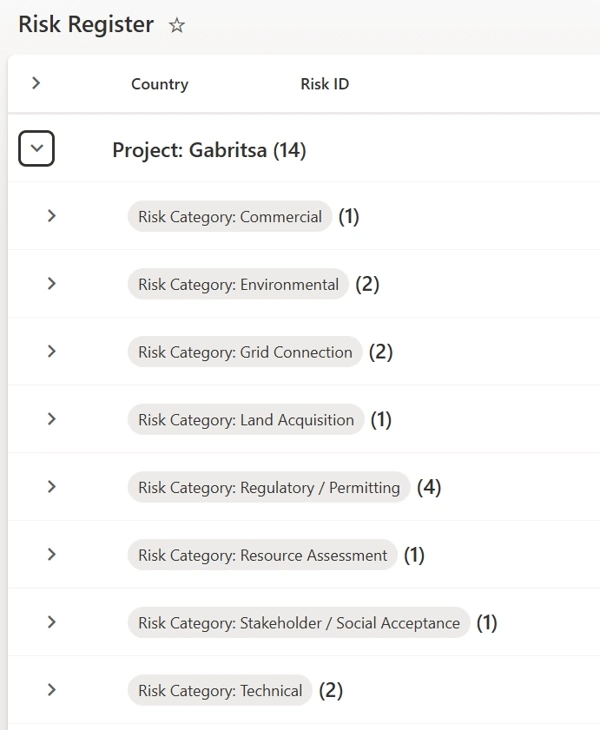
Dedicated views group and filter risks by different criteria — by project, category, country, or for Risk Committee attention specifically. This helps each user group focus on the items most relevant to them:
Grouped view of risks by project and risk category, helping users navigate the register more easily.
Risk Register Snapshots preserve the state of risks at a given point in time, creating a solid foundation for historical analysis and trend tracking as the solution matures.
Mobile access and usability
Users may need to review or update risks while away from their desks, so practical mobile access was a requirement. Together with the visual improvements in Plumsail Forms, this helped create a cleaner and more accessible experience for day-to-day use.
Results of the pilot
Although the solution is still in pilot, it has already introduced a simplified and consistent process for risk management. Risk management is no longer dependent on scattered spreadsheets and inconsistent formats — the organization now has a centralized tool that supports structured assessment, clearer ownership, automated escalation, and shared visibility across teams.
The pilot also provides a scalable foundation for broader adoption, with the solution planned to support approximately 10 countries and 39 projects in production.
Benefit
What changed
Centralized register
Risks are stored in one structured SharePoint-based register instead of multiple spreadsheet files.
Consistent scoring
Probability, severity, and calculated risk score are applied consistently through the form.
Clearer ownership
Permissions and views reflect the roles involved in the risk management process.
Faster escalation
Power Automate notifications bring material risks to Risk Committee attention automatically.
Better usability
Plumsail Forms provides a clearer layout with visual indicators and live business logic.
Scalable foundation
The structure supports wider rollout across countries and projects, with future reporting potential.
Conclusion: a clear risk management solution
Plumsail Forms helped us turn a messy, spreadsheet-based process into a centralized and practical risk management tool. What made the real difference was the ability to combine visual clarity with business logic directly in the form, so the process became both simpler for users and stronger from a governance perspective.
By combining Plumsail Forms with SharePoint and Power Automate, CWP Global built a risk management solution that is visually clearer, easier to use, and much more aligned with the real governance needs of the organization. The result is a centralized process that supports transparency, collaboration, and escalation — while remaining simple enough for everyday use.
Get started with Plumsail Forms for SharePoint
Ready to bring structure and transparency to your business processes? Get started with a 30-day free trial of Plumsail Forms and see how it can work for your team.
If you have any questions, feel free to book a free call with our team.
Related posts
Customer storyFormsSharePoint
Mar 19, 2025
SharePoint Appraisal System: CWP Global's experience with Plumsail Forms
Learn how CWP Global built a SharePoint appraisal system using Plumsail Forms for SharePoint Online, making their performance review process more efficient and user-friendly.
Dessislav Shekerletov
Head of IT and Process Improvement at CWP Global
Customer storyFormsSharePoint
Sep 17, 2024
Migrate to the cloud with SharePoint Forms and Consult2.Cloud expertise
Explore how Consult2.Cloud delivers cloud migration services with Plumsail Forms for SharePoint in large-scale applications such as sales and payroll processing.
Justin Mitchell
COO and Senior Consultant at Consult2.Cloud
Customer storyFormsSharePoint
Dec 05, 2023
Using Plumsail SharePoint forms for Efficient Property Management
Find out how Plumsail Forms eliminate the need for multiple mailboxes, facilitate logging and tracking of work, and provide transparency and accountability.





 FormsSharePoint